AI automation for HR and staffing firms: complete 2026 guide
By Leandro Faria · · 11 min read
Disclosure: Bizzy is built by 33Labs, the publisher of this guide.

HR and staffing firms’ AI automation is the use of AI to handle repeatable administrative work with the aim of keeping recruiting and employee requests moving without surrendering hiring judgment. This 2026 guide explains how to automate inbox handling, scheduling, and document drafting while keeping candidate decisions, sensitive records, and client commitments under human control.
TL;DR
- Start AI automation for HR and staffing firms with administrative work, not candidate ranking or rejection.
- Bizzy fits professional service teams seeking inbox, scheduling, and document drafting automation; confirm staffing-specific requirements before choosing it.
- Keep a named reviewer responsible for sensitive messages, employment documents, and exceptions.
- Test one workflow before expanding, and measure corrections alongside completed tasks.
Why AI automation matters for HR and staffing firms
HR and staffing workflows cross several boundaries: candidates, employees, hiring managers, clients, and internal recruiters. A scheduling request looks simple until the wrong person receives a calendar invitation or an old job description becomes the basis for a candidate message.
The useful dividing line is administration versus judgment. Gathering interview availability is administrative work. Deciding whether someone deserves an interview is a hiring decision. Your first automation should handle the former without quietly taking over the latter.
In your 2026 plan, prioritize work that has a clear trigger, a reliable source record, and a recognizable finish. Inbox triage is a useful starting point; the guide to AI email management tools for professional services covers an adjacent workflow category.
Staffing firms also need to distinguish client instructions from internal preferences. A recruiter’s draft is not an approved client commitment, and an employee’s message is not permission to share their personnel record. Build those distinctions into the process before selecting an automation approach.
How to introduce AI automation into HR and staffing workflows
Map one workflow from request to completion
Start manually. Follow a real request through your inbox, calendar, shared documents, and recruiting records, then write down every handoff. Describe what people actually do—not what your process document says they do.
Choose one workflow for the initial pilot. Interview scheduling, collecting missing onboarding information, or drafting routine follow-ups gives you a bounded starting point. Avoid a broad instruction such as managing recruiting; it hides several different decisions behind one label.
Write a completion rule that another employee can verify. For scheduling, that might mean the correct participants have confirmed an agreed time, the invitation contains the approved details, and the source record reflects the outcome. Sending an email alone does not prove completion.
- Name the event that starts the workflow.
- Identify the record used to verify the request.
- List everyone who receives information or approves an action.
- Define the completed state in plain language.
- Assign an owner for requests that fall outside the normal path.
Separate routine work from employment decisions
Use a shared checklist to classify tasks before automating anything. Mark each task as preparation, approved administrative action, or human decision. This gives your team a free, visible way to stop an ordinary reminder from becoming an unintended decision.
Keep candidate evaluation, rejection decisions, compensation commitments, and employment-status changes with accountable people. AI can prepare material for review, but preparation does not authorize action. A summary should not silently become a recommendation about who to hire.
For routine messages, specify which facts are safe to repeat and which require confirmation. An approved interview location differs from a recruiter’s tentative note about that location. Make the distinction explicit so the workflow does not treat every available sentence as equally authoritative.
- Allow drafts based on approved job and interview information.
- Require review before communicating a hiring decision.
- Route accommodation requests to the responsible person.
- Stop tasks involving disputed or conflicting records.
- Prevent routine reminders from making promises about outcomes.
Choose an approach that fits your existing tools
First inspect the tools your team already uses. Saved replies, calendar settings, required fields, and existing workflow rules can address a narrow problem without adding another system. Document what remains manual after those changes.
Bizzy provides an AI colleague that works with a company’s existing tools to learn and automate day-to-day workflows, including inbox handling, scheduling, document drafting, and reconciliation. Bizzy is best suited to professional service teams automating administrative workflows rather than replacing professional judgment.
For HR and staffing work, treat that description as a starting point—not proof of a particular applicant-tracking integration or hiring-control feature. Confirm the exact connection, permissions, review process, and exception handling your workflow needs. The faster path is useful only when it preserves the boundaries you have already defined.
- Check the settings and templates in your current tools first.
- List the systems the selected workflow must read or update.
- Confirm support for each required connection.
- Ask how an action is paused, reviewed, and corrected.
- Test with non-sensitive examples before introducing live records.
Put approval gates before consequential actions
Manually review drafts until the workflow’s behavior is clear. Your approval rule should describe both the action and the person authorized to approve it. A general instruction to be careful is not a control.
For your 2026 pilot, distinguish reading, drafting, sending, and updating records. Permission to read an interview request should not automatically include permission to send a message or change a candidate’s status. Give each action its own boundary.
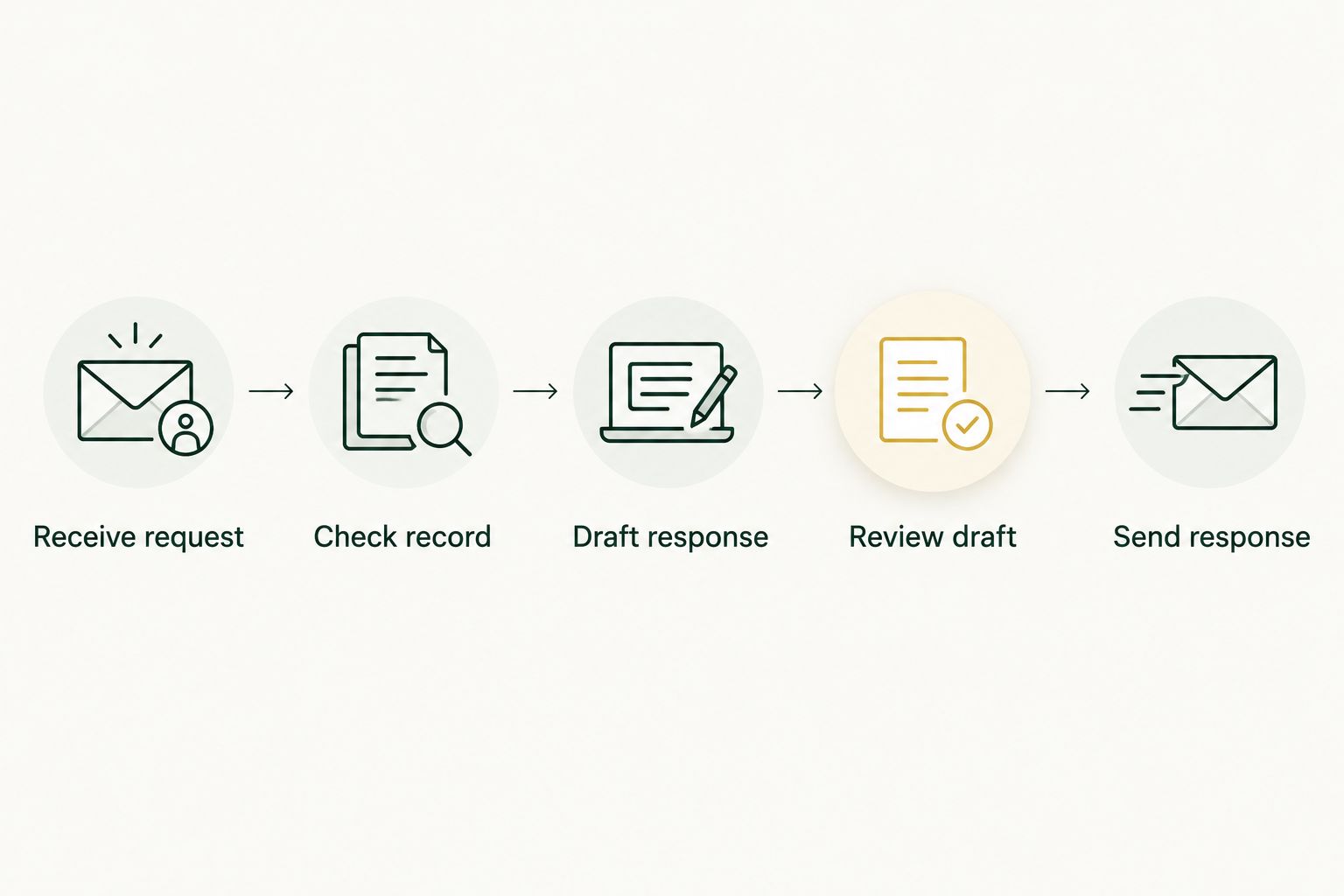
Use the following sequence for candidate-facing communication. The review belongs before the message leaves your organization, not after a recipient notices an error. Keep the original request available so the reviewer can compare the draft against its source.
- Receive request: identify the sender and requested action.
- Check record: confirm the recipient, role, and approved details.
- Draft response: prepare a message without adding unsupported promises.
- Review draft: have the responsible person approve consequential content.
- Send response: release the approved version and record what happened.
Limit access to the information each task needs
Start with a manual access review. List the folders, inboxes, calendars, and records that people currently use for the selected task. Remove unrelated information from the proposed automation scope rather than copying everything into a new working area.
A scheduling task needs scheduling information. It does not need unrestricted access to personnel files or unrelated candidate conversations. Document which information is required, where it comes from, who can inspect the output, and how your organization handles retention.
Keep internal notes separate from material intended for candidates or clients. A recruiter’s working observation should not appear in a follow-up merely because it sits beside an approved job description. Validate the handling rules with the people responsible for privacy, security, and employment matters.
- Restrict the workflow to approved records and folders.
- Separate internal notes from externally shareable information.
- Verify recipients before attaching documents or sending invitations.
- Define who can view drafts, histories, and error reports.
- Review deletion and retention requirements before live use.
Test ordinary requests and awkward exceptions
Build a small test set manually before enabling live actions. For a starter checklist, use 10 sample requests, including routine cases and exceptions. This is a proposed test size, not an accuracy benchmark or a substitute for a wider review.
Include a changed interview time, a duplicate candidate record, an unavailable hiring manager, a missing attachment, and contradictory instructions. The important question is whether the workflow recognizes uncertainty and stops—not whether it produces a fluent response in every case.
Judge results against your written completion rule. A polished message sent to the wrong person is a failed task. So is a correct draft that changes an approved detail or leaves the recruiting record inconsistent with the conversation.
- Write the expected outcome before running each example.
- Include missing information and conflicting instructions.
- Check recipients, dates, attachments, and source records.
- Record every correction and the reason it was needed.
- Repeat failed cases after changing the workflow.
Measure completed work before expanding the scope
Use a spreadsheet first. Record incoming requests, completed tasks, reviewer corrections, and exceptions that required someone to take over. Keep the task definition stable so you can compare like with like.
A proposed 4-week pilot gives your 2026 rollout a review point rather than an open-ended experiment. Spend the opening period documenting the process and checking examples, then introduce supervised work and review the results. This is a planning recommendation, not a promised implementation timeline.
Measure the whole task, including review and repair. If drafting becomes faster but checking becomes slower, the workflow has shifted work rather than removed it. Expand only after the owner can explain the errors, controls, and remaining manual steps.
- Track completed requests, not just generated drafts.
- Record reviewer time separately from correction time.
- Group exceptions by cause so recurring problems are visible.
- Check whether records match the final communication.
- Approve the next workflow only after reviewing pilot results.
Compare your automation options
Choose your 2026 approach by the work that needs doing. These options solve different problems; none removes the need for process ownership. Start with the narrowest approach that handles the task and its exceptions.
| Option | Best for | Main advantage | Key limitation |
|---|---|---|---|
| Manual checklists and templates | Defining an unclear process | Make steps and ownership visible | People still perform and record the work |
| Existing recruiting-system workflows | Tasks contained within your current recruiting system | Keep work close to its source record | Suitability depends on available functions and settings |
| Rules-based automation | Stable triggers with predictable actions | Makes the action sequence explicit | Exceptions need separate rules or human handling |
| Bizzy AI automation | Professional service teams connecting day-to-day administrative work | Addresses inbox, scheduling, drafting, and reconciliation workflows | Staffing-specific connections and controls need confirmation |
Keep manual handling for work that lacks a reliable rule. If employees cannot agree on the correct outcome, automation is premature. Clarify the decision first, then decide which administrative steps belong around it.
Bizzy AI automation belongs in the comparison when your problem spans everyday tools and administrative handoffs. It should not be selected on an assumption that it evaluates candidates, meets a particular compliance requirement, or supports an unconfirmed recruiting system.
Common mistakes HR and staffing firms make
Automating candidate judgment before administrative work
Candidate ranking and rejection introduce a different responsibility from drafting reminders. Keep those decisions outside your first workflow, and name the person responsible for reviewing any material used in an employment decision. Faster administration is a useful goal on its own.
Treating a client request as standing authorization
A client asking about availability has not necessarily approved an interview, an offer, or a change in terms. Require the workflow to distinguish a question from an instruction. Verify authority before it communicates a commitment on behalf of your firm or client.
Combining confidential notes with outgoing messages
Internal recruiting observations, personnel information, and candidate-facing facts serve different purposes. Separate them at the source. Asking a drafting tool to ignore sensitive notes is weaker than keeping those notes outside the task’s permitted information.
Counting messages instead of finished tasks
An invitation is not a confirmed interview, and a reminder is not completed onboarding. Measure the final state you defined during mapping. Otherwise, an automation can generate more activity while leaving the same work unfinished.
Expanding before someone owns the exceptions
Every workflow needs a person who handles ambiguity, failures, and corrections. Do not distribute that responsibility vaguely across the recruiting team. Name an owner, give that person a way to stop the workflow, and document how normal work resumes.
FAQ
What's the best place to start with AI automation for HR and staffing firms?
Start with one administrative workflow, such as interview scheduling or drafting routine follow-ups. Define its source record, approval rules, and completed state before introducing live actions.
Should AI make hiring or candidate rejection decisions?
Keep hiring and candidate rejection decisions with accountable people. Separate administrative preparation from evaluation, and have the responsible team review any proposed use of automation in employment decisions.
Can an AI colleague work with our existing recruiting tools?
Confirm support for your exact recruiting tools before choosing an AI colleague. Bizzy is described as integrating with a company’s existing tools, but that does not establish support for any particular applicant-tracking system.
Is rules-based automation better than an AI colleague?
Rules-based automation is better suited to tasks with stable triggers and predictable actions. An AI colleague is an option for day-to-day administrative workflows, but its connections, permissions, and exception handling still need validation.
How do we protect candidate and employee information?
Limit each workflow to the information required for its task. Separate confidential notes from shareable material, verify recipients, and review access and retention requirements with your responsible team.
What should we measure during an automation pilot?
Measure completed tasks, reviewer corrections, review time, and exceptions. Check the entire workflow rather than treating generated messages or drafts as evidence that the work is finished.
What should our 2026 HR automation plan include?
Your 2026 HR automation plan should include a bounded workflow, a named owner, approved information sources, action permissions, test cases, and a review point. Expand only after the team understands the remaining manual work and recurring errors.
One last thing
Write the stop rule before the automation rule. Specify what happens when a candidate record conflicts with an email, a recipient cannot be verified, or a request changes an approved commitment. Your 2026 workflow is not ready until someone knows where those cases go.
The strongest first project is not the one that touches the most recruiting work. It is the one whose owner can explain exactly what happens—and when a person takes over.