Patent-firm administration: inventor reminders without disclosure access
By Leandro Faria · · Updated · 12 min read
Disclosure: Bizzy is built by 33Labs, the publisher of this guide.

This guide helps a patent practice define inventor-meeting and missing-information reminders using approved administrative details, not the contents of invention disclosures. It separates those handoffs from prosecution strategy, claim drafting, docketing decisions and access to confidential technical material.
Bizzy’s standard service covers front-office administration: inquiry follow-up, routine scheduling, and reminders from approved administrative details. It does not include access to financial or privileged documents, substantive legal drafting, or custom integrations. Any proposed work beyond that boundary needs a separately agreed scope, verified technical support, and an approved data-handling arrangement; a case study is not evidence that it is included for every customer.
- AI automation for IP and patent law firms should start with administrative workflows, not patentability opinions or filing decisions.
- Standard Bizzy administration can coordinate inventor meetings and reminders; it does not include privileged invention disclosures or patent drafting.
- Keep substantive client communications, patent drafting and filing outside the administrative pilot, with qualified counsel responsible.
- Test inventor contact details, matter references and reminder exceptions without accessing invention disclosures.
Why automation matters for IP and patent law firms
Patent work combines detailed legal analysis with repetitive coordination. Your team collects inventor information, chases missing documents, schedules discussions, drafts updates, and moves correspondence into the right matter. Those administrative steps deserve their own workflow; they should not inherit the authority of the lawyer responsible for the case.
An inventor’s reply can contain information relevant to several matters. A message about a deadline can require legal interpretation before anyone sets a reminder. An attachment can contain confidential technical material. Automation needs a clear answer to two questions: which matter does this belong to, and who is authorized to act?
Consider Bizzy for professional service teams seeking help with everyday workflows, not a substitute for patent counsel. Bizzy provides an AI colleague that integrates with existing company tools and learns day-to-day work, including inbox handling, scheduling, administrative follow-ups, and reminder coordination.
For your 2026 rollout, treat that colleague like a new hire. Explain the assignment, limit access, review the work, and define when it must ask for help. Do not assume it knows your docketing rules or your confidentiality obligations because it can write a convincing email.
The practical distinction is between preparing work and authorizing work. Preparing a reminder draft is an administrative task. Deciding which legal deadline governs a response is a legal responsibility. Your workflow should make that boundary visible.
Build the workflow before choosing the tool
A useful automation plan names the trigger, the source material, the responsible person, and the permitted action. It also names the stopping point. Without that stopping point, a small inbox task can become an unauthorized client communication.
Use the following steps for a controlled 2026 pilot. The durations and sample sizes are planning recommendations, not promises about implementation speed or results. Expand only when the work meets your written acceptance criteria.
1. Map one repeatable administrative task
Start manually. Pick a task your staff can explain from beginning to end, such as preparing an inventor-information reminder after an approved request has gone unanswered. Write down what a person checks before drafting it.
Avoid starting with a broad instruction such as managing patent prosecution. That combines legal decisions, records, correspondence, and deadlines. A narrower assignment makes mistakes easier to identify and gives your reviewer something concrete to approve.
For an initial baseline, observe the task over 5 business days. Record the actual handling time, the corrections required, and the reasons someone escalates it. Do not label every delay as wasted time; waiting for attorney review or client instructions serves a different purpose from copying information between records.
Choose a task with a defined finish. A draft placed in a review queue is a finish. A client obtaining a patent is not an appropriate finish for an administrative pilot.
- Name the task and its owner.
- Record what starts the task.
- Identify the approved source documents.
- Define the completed output.
- List situations that require a person.
2. Define the matter boundary and approval route
Create the manual checklist first. Identify the correct client, matter identifier, authorized recipients, and source correspondence before your team prepares an output. If those details conflict, stop the task rather than guessing.
Keep matter matching separate from legal interpretation. Matching an email to a known matter does not establish that an attachment is legally complete or that a proposed deadline is correct. Your responsible attorney must decide those questions under the firm’s normal procedures.
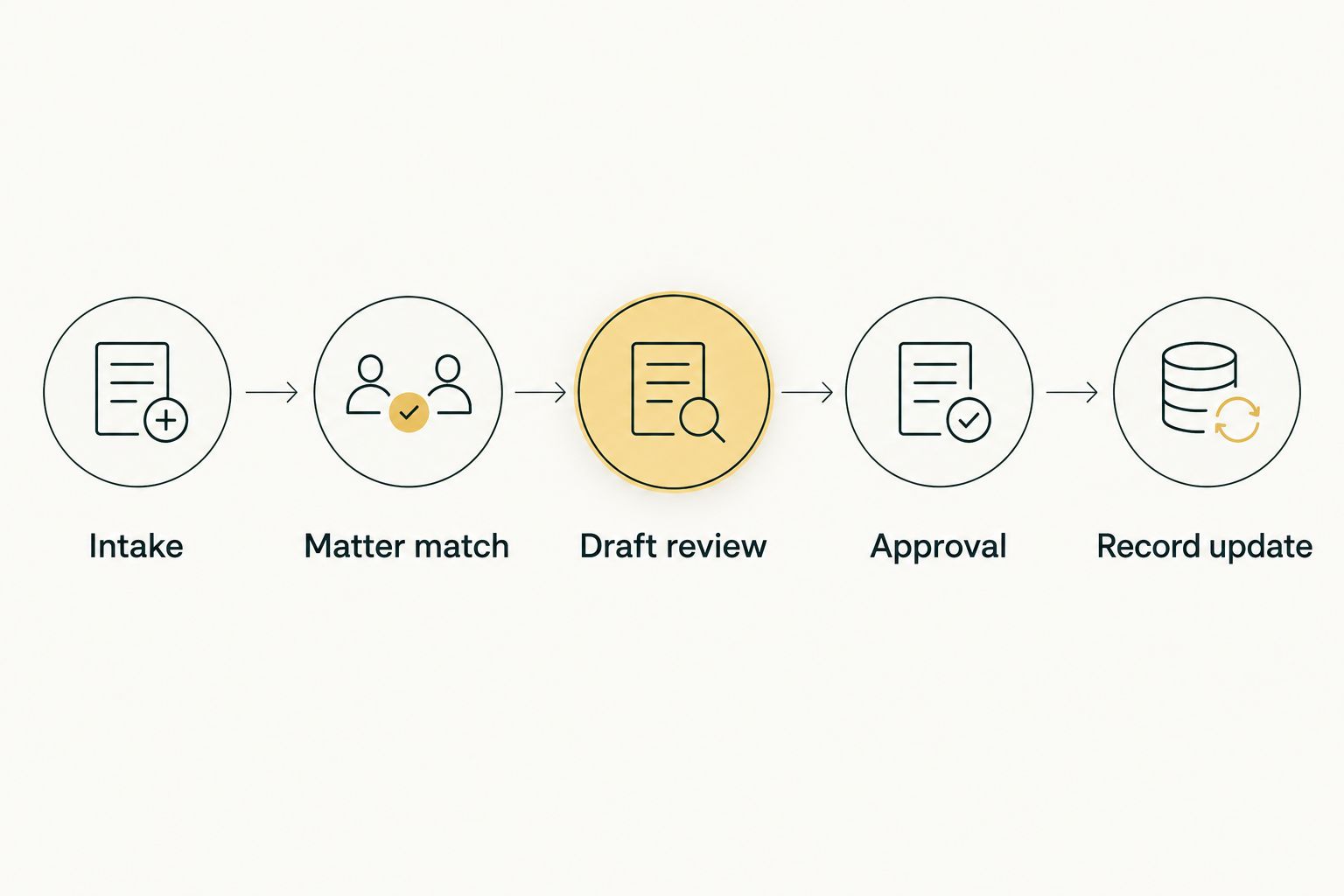
Write the route in plain language: Intake, Matter match, Draft review, Approval, Record update. Each stage should have an owner and an observable result. This is a proposed control design, not a claim that any particular service includes these controls automatically.
Your 2026 workflow specification should also explain what happens after rejection. A rejected draft should not keep circulating as if it were approved, and a corrected draft should remain distinguishable from the original.
- Intake: identify the request and source.
- Matter match: confirm client and matter.
- Draft review: check facts and scope.
- Approval: name the authorized reviewer.
- Record update: retain the approved outcome.
3. Delegate preparation, not legal judgment
Prepare the first examples yourself. Give the person doing the task an approved message, a completed example, and a short explanation of what must remain unchanged. This establishes a reference before you introduce automation.
For Bizzy’s standard service, limit the preparation layer to non-privileged administrative details: the approved meeting participants, contact channel, and whether a requested item remains outstanding. Confirm whether the specific assignment, connections, and review process you need are supported before relying on them.
For a patent team, an appropriate starting assignment is a meeting reminder based on an approved participant list and time, without reading the underlying invention disclosure. Keep patentability analysis, claim strategy, legal deadline interpretation, and filing authorization outside that assignment. A draft can help a lawyer work; it does not become legal advice merely because the language reads well.
Give instructions the same way you would explain the task to a new colleague. Specify what to prepare, what source to use, and what requires a question rather than an answer.
- Prepare scheduling messages from approved instructions.
- Draft follow-ups about missing administrative information.
- Organize inbox items for human review.
- Prepare administrative reminders from staff-approved status fields, not substantive patent documents.
- Escalate requests for legal advice or substantive changes.
4. Limit access and document confidentiality requirements
Start with a written access list. Name the mailboxes, calendars, folders, and matter records needed for the chosen task. Do not connect an entire firm’s working environment simply because a broader connection is convenient.
Before processing client material, review the service’s terms and documented handling practices. Your firm needs to understand who can access information, how it is retained, how deletion works, and whether the arrangement meets your professional responsibilities and client commitments. Treat unanswered questions as unresolved requirements.
With Bizzy, ask for the specific implementation and data-handling details your firm needs; integration with existing tools does not itself answer confidentiality questions. Confirm access restrictions and approval behavior in the actual setup rather than assuming them from a general description.
Use synthetic examples for initial instruction where practical. Use only approved non-privileged administrative details in the standard pilot. A test involving confidential invention material requires a separately scoped arrangement and professional authorization, not simply a broader pilot permission. A technically successful task is not acceptable if it uses information outside that boundary.
- Identify only the records the task requires.
- Confirm who can grant and revoke access.
- Review retention, deletion, and data-use terms.
- Keep unrelated client matters outside the pilot.
- Document the process for reporting an access incident.
5. Test exceptions before allowing routine actions
Run the workflow manually against difficult examples first. Include incomplete requests, conflicting matter references, forwarded email chains, changed recipients, and instructions that contradict an earlier message. Your goal is to define the correct response before testing automated preparation.
Use 10 sample matters as a manageable starting test set, provided your firm authorizes their use. Include both straightforward cases and cases that should stop. The sample size is a suggested pilot boundary, not evidence that the workflow is safe after a fixed number of tests.
For each test, compare the proposed result with the result your designated reviewer expects. Record incorrect facts, wrong matter matches, omitted context, and actions attempted outside the assignment. A refusal to continue when information is missing can be the correct result.
Keep substantive outputs outside this administrative pilot, including drafts. Do not let a successful scheduling example justify automated filing or deadline calculation. Those are different assignments with different consequences and need separate evaluation.
- Test an email naming the wrong matter.
- Test missing or contradictory source information.
- Test an unexpected recipient change.
- Test a request for legal interpretation.
- Test whether rejection actually stops the action.
6. Measure accepted work and expand one task at a time
Keep a simple manual review log before adding reporting tools. Record the task, reviewer, outcome, correction, and handling time. Count accepted outputs separately from drafts that required substantial repair.
Reserve 30 minutes each week to review the pilot with the responsible attorney and staff owner. Discuss the exceptions, not just the volume completed. A workflow that produces many drafts but creates additional checking work has not yet met its purpose.
Bizzy’s AI automation should be evaluated against the workflow you defined, not against a general promise to reduce busywork. Compare the same task before and after delegation, including review time. Keep quality and confidentiality requirements separate from speed so that a faster result cannot hide a failed control.
For your 2026 expansion plan, add only one new assignment at a time. Scheduling and document drafting share some administrative features, but each needs its own sources, approval rules, and stopping conditions.
- Track accepted outputs and rejected outputs separately.
- Include review and correction time in your comparison.
- Record every wrong-matter or access exception.
- Assign an owner to resolve recurring failures.
- Expand only after the current task meets written criteria.
Compare your implementation options
Choose the approach that matches the work, not the most impressive demonstration. You can combine approaches, but each task still needs one owner and a clear approval route.
The options below describe different ways to organize work. They are not interchangeable: an administrative colleague, a fixed rule, and an attorney reviewing substance solve different problems.
| Option | Best for | Main advantage | Key limitation |
|---|---|---|---|
| Manual checklist and review queue | Defining a new or irregular workflow | Makes decisions and exceptions explicit | Staff must perform and record each step |
| Existing-tool rules and templates | Predictable routing and standard reminders | Uses fixed instructions for repeatable tasks | Rule changes and unusual cases require maintenance |
| Bizzy | Day-to-day coordination across existing company tools | Supports inquiry follow-up, scheduling, and administrative reminders | Suitability for your matter controls and data requirements needs confirmation |
| Attorney-led drafting and review | Substantive patent analysis and client advice | Keeps legal decisions with the responsible professional | Requires attorney attention rather than administrative delegation |
Choose manual checklists when you do not yet understand the exceptions. Choose fixed rules when the trigger and action are stable. Consider an AI colleague when preparation spans everyday tools and needs written context. Keep substantive legal decisions with counsel regardless of the administrative approach.
Common mistakes IP and patent law firms make
Treating a deadline message as an approved docket entry
An email mentioning a date is source material, not automatic authority to change the docket. Require the responsible person to confirm the governing deadline and the correct matter before updating the authoritative record. Keep reminder preparation distinct from deadline determination.
Letting similar inventions blur matter boundaries
Inventor names, technical terms, and document titles can overlap across matters. Do not use a familiar invention description as the only matching instruction. Require an approved identifier and a clear exception route when the source information disagrees.
Confusing fluent drafting with verified substance
A readable summary can omit qualifications or introduce a statement the source does not support. Require reviewers to check substantive statements against the approved record. For patent claims, legal opinions, and filing materials, preserve the firm’s attorney-led review rather than treating administrative pilot results as proof of readiness.
Granting broad access before defining the assignment
A general instruction to help the patent team does not explain which client records the colleague needs. Start with the task boundary, then grant the access necessary to perform it. Review access again whenever you add a task or change its owner.
Measuring draft volume instead of usable work
Drafts are intermediate output. Your useful measure is work accepted under the firm’s review criteria, with correction time included. Keep a record of stopped tasks too: correctly escalating an ambiguous instruction protects the workflow even though it does not produce a finished email.
FAQ
What is AI automation for IP and patent law firms?
AI automation for IP and patent law firms is the delegation of repeatable office tasks to an AI system under defined instructions and human oversight. Suitable starting tasks include inbox coordination, scheduling, and preparing drafts from approved information.
What should a patent law firm automate first?
Start with a narrow administrative task that has clear source material and a defined reviewer. Preparing a missing-information reminder is easier to bound than managing prosecution or determining legal deadlines.
Can AI make patentability decisions for the firm?
Do not delegate final patentability decisions to an administrative automation workflow. Keep legal analysis, advice, and strategy with qualified counsel, and review any generated research or drafting before relying on it.
Is Bizzy a patent docketing system?
Bizzy is described as an AI colleague for everyday workflows across existing company tools, not as a patent docketing system. Confirm any proposed interaction with your docketing records before including it in an implementation.
Can we use automation with confidential invention disclosures?
Confidential invention disclosures are not part of standard Bizzy administration. Keep their contents out of scheduling and reminder inputs. Any separate implementation that would process them needs a specifically authorized scope, confidentiality review and verified data-handling controls.
Is an AI colleague better than email rules?
An AI colleague and email rules suit different assignments. Fixed rules suit predictable routing, while a colleague that works across existing tools can support preparation tasks involving context; both need task-specific controls.
How do we know whether the pilot is working?
Compare accepted work, review time, correction time, and exceptions against the same manually performed task. Do not expand a pilot because draft volume increases if quality, matter matching, or confidentiality requirements remain unresolved.
One last thing
The most useful instruction in a patent-firm workflow is often the instruction to stop. Write down what a new colleague should do when the matter is unclear, the recipient changes, or the request needs legal judgment.
For your 2026 pilot, make that stopping behavior part of acceptance—not an inconvenience to remove. A workflow that asks the right question is more useful than one that confidently completes the wrong assignment. Start with a reminder draft, inspect the exceptions, and earn the next task.