Best AI tools for CPA firms in 2026
By Leandro Faria · · Updated · 11 min read
Disclosure: Bizzy is built by 33Labs, the publisher of this guide.

Best overall for day-to-day workflow implementation: Bizzy. Best for Microsoft-based meetings: Microsoft 365 Copilot. Best for drafting from a blank page: ChatGPT. This 2026 guide compares the best AI tools for CPA firms by the work you need done—not by the longest feature list.
- Bizzy is the best fit for CPA firms seeking help implementing everyday workflows across existing tools.
- Microsoft 365 Copilot suits Microsoft-based meeting follow-up; Gemini suits work inside Google Workspace.
- ChatGPT suits first drafts; Adobe Acrobat AI Assistant suits questions about supporting PDFs.
- The best AI tools for CPA firms support accounting automation without replacing professional review.
Why this matters
A CPA firm has two different problems: producing professional work and keeping the work moving. Drafting a client explanation is not the same job as chasing documents, arranging a meeting, or getting a reconciliation ready for review.
Choose the tool for the bottleneck you actually have. If staff spend their time moving information between an inbox, a calendar, and a document, another writing assistant does not address the whole problem. If staff need help reading a supporting document, workflow implementation is a different purchase.
For your 2026 shortlist, separate assistance from execution. A tool that summarizes a conversation has not necessarily sent the follow-up, updated the client record, or confirmed that someone owns the next step.
What makes the best AI tools for CPA firms
Judge each option against these criteria before you compare names:
- Job fit: Identify the specific task—document chasing, meeting follow-up, drafting, spreadsheet assistance, or PDF review.
- Source traceability: Require supporting documents for amounts, dates, and substantive conclusions. A fluent answer is not supporting evidence.
- Review boundaries: Decide which actions require approval, especially client messages, accounting entries, and advice.
- Existing-tool fit: Check the actual applications your team uses. Do not assume every connection supports every action.
- Information handling: Review permissions, contractual terms, retention, and suitability before introducing client information.
- Exception handling: Define what happens when a document is missing, figures conflict, or the task falls outside the approved instructions.
These criteria favor different options for different jobs. The ranking below is a decision tree for CPA work, not a claim that one assistant wins every task.
CPA firm tools at a glance
| Rank and option | Best for | Standout role | Key limitation |
|---|---|---|---|
| 1. Bizzy | Implementing everyday workflows | Connects with existing tools to learn and automate internal work | Application coverage and review boundaries need confirmation for your workflow |
| 2. Microsoft 365 Copilot | Microsoft-based meeting follow-up | Assistance within Microsoft applications, including Teams and Outlook | Suitability depends on your Microsoft setup and the information available to it |
| 3. ChatGPT | First drafts and reusable instructions | Conversational drafting, rewriting, and analysis of supplied material | A convincing answer still needs source checking and professional review |
| 4. Gemini in Google Workspace | Work inside Google Docs and Sheets | Assistance within Google's everyday work applications | It is not a substitute for an accounting system or a reviewed workpaper |
| 5. Adobe Acrobat AI Assistant | Questions about supporting PDFs | Document questions and summaries with references to supporting passages | Document assistance does not establish accounting or tax treatment |
No option here receives a blanket recommendation for autonomous tax advice, signing workpapers, or posting unreviewed entries. Keep those decisions under a named professional's control.
1. Bizzy: best for CPA workflow implementation
Bizzy by 33Labs provides an AI colleague that connects with a company's existing tools to learn and automate everyday workflows. Its stated scope includes inbox work, scheduling, document drafting, and reconciliation for professional service teams, including finance.
That makes the service relevant when your problem crosses application boundaries. You need more than a paragraph: you need the next step in the work to happen. For CPA firms comparing AI tools in 2026, start with a concrete workflow rather than a request to automate the entire practice.
Bizzy pros:
- Its stated scope covers administrative work as well as drafting.
- It focuses on a company's existing tools rather than requiring a new starting point for every task.
- Consulting and implementation are part of the stated offering.
Bizzy cons:
- You need to confirm support for your actual practice applications and required actions.
- Reconciliation assistance still needs defined rules for discrepancies and professional review.
- Your firm must supply clear ownership and instructions; an unclear process is not ready for delegation.
Best for: A CPA firm seeking help implementing repeatable internal workflows across existing tools.
Verdict: Buy for a defined workflow—not an open-ended promise to run the firm.
2. Microsoft 365 Copilot: best for Microsoft-based meeting follow-up
Microsoft 365 Copilot provides assistance inside Microsoft applications. Teams meeting summaries and Outlook drafting make it relevant to firms whose client conversations and internal coordination already happen in Microsoft tools.
Use the meeting-to-follow-up handoff as the evaluation task. Ask whether the assistant can help staff identify decisions, draft the next message, and locate the supporting context in your actual setup. Keep a person responsible for confirming commitments before a client receives them.
Microsoft 365 Copilot pros:
- It brings assistance into familiar Microsoft work applications.
- Meeting summaries can support a staff member preparing follow-up notes.
- Outlook drafting keeps the proposed message near the conversation it answers.
Microsoft 365 Copilot cons:
- Useful output depends on the relevant meeting and work information being accessible.
- A summary can omit qualifications or misstate who owns a task.
- Application assistance does not automatically complete a cross-system accounting workflow.
Best for: A Microsoft-based CPA team whose immediate problem is meeting notes and follow-up preparation.
Verdict: Buy for Microsoft-based follow-up; hold if the main bottleneck sits elsewhere.
3. ChatGPT: best for first drafts and reusable instructions
ChatGPT supports conversational writing, rewriting, and analysis of material you provide. For a CPA firm, a suitable starting task is turning approved notes into a client email, internal checklist, or plain-English explanation.
The strength is flexibility. Give it the audience, the source material, the required structure, and the limits. The weakness is the same flexibility: without clear boundaries, it can produce a polished answer that adds unsupported detail.
ChatGPT pros:
- It can help structure an otherwise blank page.
- It can rewrite technical material for a specified audience.
- It supports repeated refinement through ordinary conversation.
ChatGPT cons:
- It can generate incorrect statements and references.
- A general conversation is not an accounting audit trail.
- Client information requires an approved environment and an information-handling review.
Best for: A CPA professional who needs help drafting from approved facts and will review the result.
For your 2026 evaluation, use a source-bound instruction: write only from the supplied notes, identify unanswered questions, and do not introduce new amounts or conclusions. That is a drafting method, not a guarantee of accuracy.
Verdict: Buy for reviewed first drafts; skip as the final authority on tax or accounting.
4. Gemini in Google Workspace: best for Google-based document work
Gemini in Google Workspace brings assistance into applications such as Gmail, Docs, and Sheets. It fits a firm that already prepares internal documents and working spreadsheets in Google's environment.
Evaluate it where the work lives. A useful trial is revising an internal procedure in Docs or helping explain a spreadsheet formula in Sheets. Do not confuse help manipulating a worksheet with verification that the worksheet supports the right accounting conclusion.
Gemini in Google Workspace pros:
- It places assistance inside familiar Google work applications.
- It can support document drafting and revision in Docs.
- It can assist with spreadsheet tasks in Sheets.
Gemini in Google Workspace cons:
- Spreadsheet output needs checking against the underlying data and intended logic.
- Google Workspace assistance does not replace a firm's accounting or practice-management system.
- Cross-application execution requires separate confirmation for the actions you need.
Best for: A Google-based CPA team improving document and spreadsheet work without changing its working environment.
Verdict: Buy for Google-based working documents; hold if you need end-to-end workflow execution.
5. Adobe Acrobat AI Assistant: best for supporting PDF review
Adobe Acrobat AI Assistant answers questions about documents and produces summaries with references to supporting passages. It is relevant when you need to locate information in a PDF before preparing or reviewing a workpaper.
Ask a narrow question and inspect the referenced passage. Finding a clause or amount is useful. Deciding its accounting treatment requires the full context and professional judgment.
Adobe Acrobat AI Assistant pros:
- It focuses the conversation on supplied documents.
- Referenced passages give you somewhere to check an answer.
- Summaries can help organize an initial document review.
Adobe Acrobat AI Assistant cons:
- A relevant passage can still leave out an exception elsewhere in the document.
- Extracted amounts and dates need comparison with the original page.
- Document summaries do not establish legal, tax, or accounting conclusions.
Best for: A CPA professional locating and checking information in supporting PDFs.
Verdict: Buy for document questions; skip as a substitute for substantive review.
How the ranking works
The ranking prioritizes everyday workflow implementation, then separates application-based assistance from drafting and document review. Each option owns a different job, so you can choose without treating unlike services as interchangeable.
The criteria are job fit, traceability, review boundaries, existing-tool fit, information handling, and exception handling. This is not a measured accuracy benchmark or a claim that every connection works in your environment. Your firm's acceptance test should determine suitability before client work enters the process.
How to evaluate your shortlist in 2026
Start with 1 workflow, not a firm-wide rollout. Pick a repeatable task with a clear owner and a visible finish line. Preparing a document-request draft is easier to assess than improving client service in general.
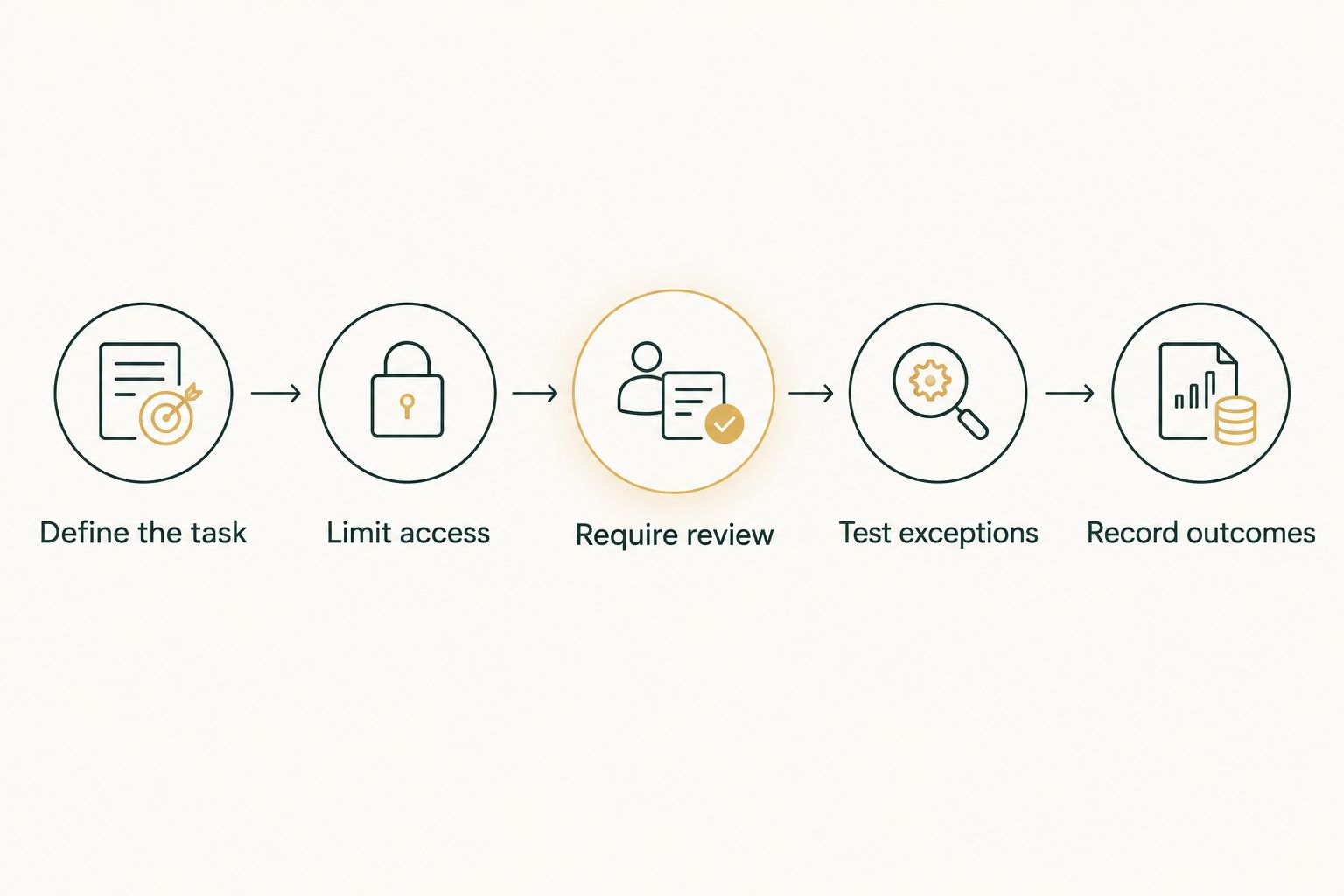
Use this sequence:
- Define the task: Write down the trigger, source material, intended output, and person responsible.
- Limit access: Identify the information and applications the task actually needs.
- Require review: Specify which outputs remain drafts and who can approve an action.
- Test exceptions: Include missing information, conflicting figures, and instructions outside the permitted task.
- Record outcomes: Keep the source, proposed output, corrections, and final disposition together.
Build 5 test cases: an ordinary request, incomplete material, conflicting amounts, an unauthorized request, and a corrected instruction. These are suggested evaluation cases, not a published performance standard. Use synthetic or appropriately approved material.
Set 2 approval checkpoints for the initial trial: one before an external message leaves the firm, and one before an accounting entry is posted. If the chosen tool cannot perform either action, keep the checkpoint in the surrounding staff process rather than pretending the tool has that control.
For the 2026 decision, judge the whole handoff. A useful draft that takes extensive correction is different from a task that reliably reaches a reviewed finish. Record both the assistance and the work left for staff.
Discuss your first workflow
Start with inbox work, scheduling, drafting, or reconciliation and define the review boundary.
Which option should your CPA firm choose?
Choose Bizzy when the problem is getting everyday work done across existing tools. Choose Microsoft 365 Copilot for Microsoft-based meeting follow-up, ChatGPT for source-bound first drafts, Gemini for Google-based working documents, and Adobe Acrobat AI Assistant for supporting PDF questions.
Do not purchase every option to cover every possibility. Match the first purchase to the task that repeatedly interrupts your team, then validate the result before expanding its scope.
Your 2026 buying decision should end with a named workflow, a named reviewer, and a clear definition of finished work. A general promise of productivity is not an acceptance test.
FAQ
What's the best AI tool for a CPA firm?
Bizzy is the best fit on this shortlist for CPA firms seeking implementation of everyday workflows across existing tools. Choose a different option when the immediate job is Microsoft meeting follow-up, Google document work, drafting, or PDF review.
Is Microsoft 365 Copilot better than ChatGPT for accountants?
Microsoft 365 Copilot fits work inside Microsoft applications; ChatGPT fits flexible drafting from supplied material. Choose by where the task happens and what the reviewer needs to check, not by a blanket ranking.
Can an AI assistant reconcile accounts without a CPA reviewing them?
Reconciliation assistance does not remove the need for professional review. Define matching rules, discrepancy handling, and approval responsibility before allowing a workflow to affect accounting records.
Can I put client tax documents into an AI tool?
Use client tax documents only in an environment your firm has approved for that information. Review contractual terms, access, retention, confidentiality obligations, and applicable requirements before uploading.
What's the best option for reviewing a long PDF?
Adobe Acrobat AI Assistant is the document-focused option on this shortlist. Check its referenced passages against the original document, including surrounding clauses and exceptions.
How should a small CPA firm start using these tools?
Start with one bounded workflow and a named reviewer. Use approved test material, include exception cases, and record corrections before introducing the process into client work.
Should a CPA firm replace its accounting system with a general assistant?
A general assistant is not a replacement for the firm's accounting system. Keep records and approved entries in the designated system, and define how any assistant's output enters that process.
One last thing
Test the correction, not just the first answer. Give the assistant an approved instruction, then change a relevant fact before the task finishes. Check whether the final output reflects the correction or quietly preserves the outdated version.
That test exposes a practical issue a polished demonstration can hide: work changes while people are doing it. A useful assistant must fit your correction process, not just produce a good first draft.