Best AI tools for solo law practitioners in 2026
By Leandro Faria · · Updated · 11 min read
Disclosure: Bizzy is built by 33Labs, the publisher of this guide.

Short answer: a one-lawyer firm should buy for the task that keeps landing back on its desk. For general drafting, ChatGPT Business. For legal research, CoCounsel or Lexis+ with Protégé. For practice management with AI built in, Clio or MyCase. For contracts, Spellbook; for discovery, Briefpoint; for document templates, Gavel. For the office work around your matters (inbox, intake follow-up, scheduling, chasing documents), Bizzy. Every price below was checked on the vendor's own page in October 2026.
TL;DR
- Nine tools a solo practice can actually buy, most with a published price.
- The cheapest entry points are a general assistant such as ChatGPT and an entry-level practice management plan; research tools quote prices through sales or an online configurator.
- Check confidentiality before using client information: ABA Formal Opinion 512 applies your existing duties to AI.
- Keep filings, legal advice, and final client communications under your own review.
Why this matters
A solo practice needs help with the work between legal decisions: chasing documents, arranging meetings, answering consultation requests, and keeping the inbox moving. It also needs help with the legal work itself. Those are different jobs, and the tool that does one rarely does the other.
Solos are also the slowest adopters. In the ABA's 2024 Artificial Intelligence TechReport, 17.7% of solo practitioners reported using AI-based tools, against 30.2% of attorneys overall and 47.8% at firms of 500 or more lawyers. That gap is partly budget and partly time: with no IT staff, a tool has to be cheap to try and simple to switch off.
The ethics rules apply to a one-lawyer firm exactly as they apply to a large one. ABA Formal Opinion 512 says the duties of competence, confidentiality, client communication, and reasonable fees govern generative AI use, and notes that a lawyer generally cannot bill a client for time spent learning a tool. California's 2026 practical guidance adds a section on agentic AI, which can act on tasks such as client intake with little prompting.
What makes a good AI tool for a solo practice?
- Task fit: it handles one job you do every week, not a job you might do someday.
- Price you can see: a published monthly price and a trial let you test without a sales cycle.
- Confidentiality: you know what happens to client information you enter, and you can turn off model training where that is an option.
- Verifiable output: for research, every authority can be opened and checked.
- Approval boundaries: you decide what stays a draft and what can be sent.
- Review burden: checking the output takes less time than doing the work yourself.
The options at a glance
| Tool | Best for | Price (checked Oct 2026) | Key limitation |
|---|---|---|---|
| ChatGPT | General drafting and rewriting | Plus $20/month; Business $25/user/month monthly or $20 billed annually | Not a source of legal authority |
| CoCounsel | Legal research and document analysis | Contact vendor for pricing (online quote configurator) | No published list price |
| Lexis+ with Protégé | Research inside Lexis+ | Contact vendor for pricing (online store for 1-3 attorneys, varies by jurisdiction and term) | Best if Lexis is your research platform |
| Clio (built-in AI) | Practice management in Clio | From $49/user/month (Starter); AI plans quoted | AI tiers not priced publicly |
| MyCase | Practice management with AI included | $50, $100, or $130/user/month billed annually; AI in Pro and Advanced | Full AI needs the $100 tier or above |
| Spellbook | Contract work inside Word | Contact vendor for pricing | Contracts only |
| Briefpoint | Discovery requests and responses | $150/attorney/month, billed annually | Discovery only |
| Gavel | Document automation and client questionnaires | From $83/month (Lite) | You build the templates |
| Bizzy | Office operations: inbox, intake follow-up, scheduling, document chasing | Scoped per firm; quoted in writing | No legal research or legal drafting |
1. ChatGPT: for general drafting and rewriting
Best for: a first draft of a plain-language letter, a rewrite of a dense paragraph, or an outline you will verify.
Price: ChatGPT Plus is $20 per month (OpenAI help center (checked Oct 2026)). ChatGPT Business is $25 per user per month billed monthly or $20 billed annually (OpenAI Business overview (checked Oct 2026)).
ChatGPT was the most-cited AI research tool in the ABA survey at 52.1%, which says more about familiarity than suitability. It writes fluently and invents citations just as fluently. Use it for drafting and editing with fictional or de-identified facts, and check anything legal against real sources.
Mind the plan. OpenAI's Plus help article says conversations may be used to improve its models unless you opt out in data controls. Turn that off, or use the Business plan, before anything resembling client information goes in.
Pros: cheapest serious option; fast first drafts.
Cons: no legal authority; confidentiality settings need attention.
Verdict: buy for drafting; never cite from it.
2. CoCounsel: for legal research and document analysis
Best for: a solo who researches often and wants AI tied to legal content.
Price: Contact vendor for pricing. Thomson Reuters gives smaller firms online quotes through a plan configurator (CoCounsel product page, checked Oct 2026).
CoCounsel is Thomson Reuters' legal AI assistant and can be paired with Westlaw. Its job is legal research, document review, and drafting tied to legal questions. Test it on a question you already know the answer to and open every authority it cites.
Pros: built for legal work; sources you can inspect.
Cons: no published list price; does nothing for your inbox.
Verdict: buy if research is your bottleneck.
3. Lexis+ with Protégé: for research inside Lexis+
Best for: a solo who already researches in Lexis.
Price: Contact vendor for pricing. LexisNexis sells plans online to firms of one to three attorneys, priced by jurisdiction and subscription length (LexisNexis online store (checked Oct 2026)).
Protégé is the AI assistant inside Lexis+. If you already trust Lexis content, it is the simpler way to add AI research than switching platforms. Buying online without a sales call suits a one-lawyer firm.
Pros: self-serve purchase for small firms; AI on top of an established database.
Cons: price depends on configuration; research only.
Verdict: the research pick for Lexis users.
4. Clio (built-in AI, formerly Clio Duo): for practice management
Best for: a solo who runs matters, time, and billing in Clio or is choosing a practice management system.
Price: plans start at $49 per user per month for Starter; AI features such as drafted bills and court documents turned into calendar events start at Core, which Clio prices on request (Clio pricing (checked Oct 2026)).
Clio's Duo page now redirects to its legal AI features page. The AI works on the matters and time entries already in Clio and leaves invoices ready for your approval. That only helps if Clio is where your practice lives.
Pros: AI on data you already keep; approval built into billing.
Cons: AI tiers not priced publicly.
Verdict: start here if you are a Clio firm.
5. MyCase: for practice management with AI included
Best for: a solo who wants case management, billing, and AI assistants in one published price.
Price: Basic $50, Pro $100, and Advanced $130 per user per month billed annually ($60, $120, and $150 monthly). The AI tools (Case Assistant, Discovery Assistant, Writing Assistant, and Document Assistant) are included in Pro and Advanced (MyCase pricing (checked Oct 2026)).
MyCase is the clearest published price in practice management: you can see exactly what the AI tier costs before talking to anyone. Compare it with Clio on the workflows you actually run, not on the AI feature list.
Pros: transparent pricing; AI bundled rather than sold as an add-on.
Cons: the AI tools need the Pro tier; switching systems is a real project.
Verdict: strong value if you are choosing a system now.
6. Spellbook: for contract drafting inside Word
Best for: a solo transactional lawyer who drafts and redlines in Word.
Price: Contact vendor for pricing. Spellbook prices by team size and offers a 7-day trial (Spellbook pricing (checked Oct 2026)).
Spellbook suggests clauses, flags risk, and compares terms inside Word. It is not research and not a general drafting tool; it is for contracts. Try it on an agreement you have negotiated before and check every suggestion against your own precedent.
Pros: stays in Word; focused on contracts.
Cons: no published price; contracts only.
Verdict: buy if contracts are your volume work.
7. Briefpoint: for discovery requests and responses
Best for: a solo litigator who answers and serves written discovery regularly.
Price: $150 per attorney per month, billed annually at $1,800 a year (Briefpoint pricing (checked Oct 2026)).
Briefpoint drafts discovery requests and responses with objections and says it covers all 50 states. For a solo litigator, discovery is often the work that fills evenings, so a narrow tool with a published price is easy to evaluate.
Pros: published price; one clear job.
Cons: annual commitment; discovery only.
Verdict: buy if discovery is a weekly task.
8. Gavel: for document automation and client questionnaires
Best for: a solo with repeat documents such as engagement letters, wills, or standard agreements.
Price: Lite $83, Standard $165, and Pro $290 per month, with Scale from $417; annual billing gets two months free (Gavel pricing (checked Oct 2026)).
Gavel turns your own templates into questionnaires that clients or staff fill in, then assembles the document. It is automation you control, which keeps the legal content yours. The cost is the time to build the templates.
Pros: uses your language, not generated text; published prices.
Cons: setup time; only as good as your templates.
Verdict: buy if you produce the same documents every month.
9. Bizzy: for office operations
Best for: a solo whose day disappears into email, scheduling, and chasing clients for paperwork.
Price: scoped per firm and quoted in writing before work starts (see the Bizzy FAQ).
Bizzy is a done-for-you AI colleague from 33Labs. Engineers build an assistant inside the email, calendar, and document tools you already use. It triages the inbox, follows up on consultation inquiries, books meetings, and chases clients for the documents a matter is waiting on. Anything client-facing or money-related waits for your approval.
It does not do legal research or legal drafting. For a solo with no staff, its value is the coordination work that otherwise falls to you at 9 p.m.
Pros: set up for you, which matters with no IT staff; approval gates on anything that leaves the office.
Cons: no legal research or drafting; no self-serve list price.
Verdict: buy for office operations; pair it with a research tool for legal work.
How these options are ranked
The order roughly follows how a solo builds a stack: a cheap general assistant, then research, then a practice management system, then single-task tools, then operations help. Each option owns a different use case; this is a selection guide, not a measured performance ranking. Prices come only from each vendor's own pricing or help pages, checked in October 2026. Where a vendor does not publish a price, we say so.
Evaluate one workflow before expanding
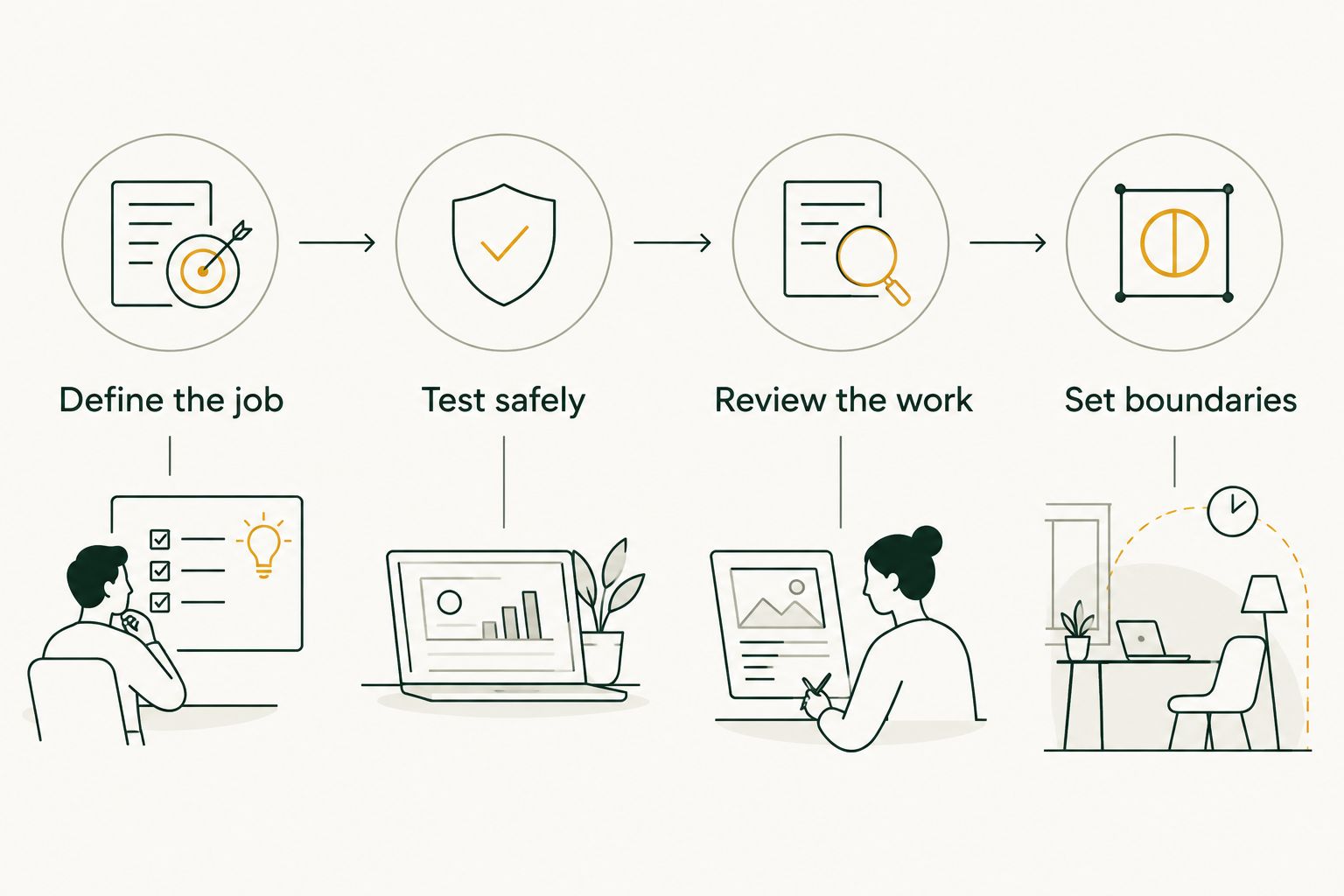
Use a bounded trial. The quantities below are suggested evaluation steps, not product performance claims.
Define the job
List 10 recurring tasks from your practice. Choose one with a clear input and a result you can check. A missing-document reminder is easier to define than a broad instruction to manage a matter.
Write down the trigger, the expected result, and the reason the assistant must stop. Include exceptions such as conflicting instructions or missing information.
Test safely
Prepare 5 sample matters using fictional or appropriately de-identified information. Include an ordinary case, incomplete information, a changed instruction, an ambiguous request, and a situation that requires escalation.
Review the work
Set aside 30 minutes to compare the results with your expected answers. Record what needed correction: facts, tone, recipients, document references, or the action itself. Count review as work; if you have to reconstruct the task from scratch, it is not ready to delegate.
Set boundaries
Decide which work can remain a draft and which actions need your approval. Keep filings, substantive advice, and consequential communications under lawyer review. Stopping and asking you is a better instruction than filling a gap with a guess.
Which option should you choose?
Start with the task that keeps returning to your desk. Drafting and rewriting: ChatGPT Business. Research: CoCounsel or Lexis+ with Protégé, depending on your platform. Matter management with AI: Clio or MyCase. Contracts: Spellbook. Discovery: Briefpoint. Repeat documents: Gavel. Unanswered consultation requests, scheduling back-and-forth, and clients who never send their documents: Bizzy.
Do not buy several overlapping assistants before deciding who owns each job and how you will review the result.
Start with your recurring office task
Identify the inbox, scheduling, or document-chasing workflow you want help with.
FAQ
What's the best AI tool for a solo lawyer in 2026?
It depends on the task. ChatGPT Business fits general drafting with fictional or de-identified facts, CoCounsel or Lexis+ with Protégé fits legal research, Clio or MyCase fits practice management with AI built in, Spellbook fits contracts, Briefpoint fits discovery, Gavel fits document automation, and Bizzy fits office operations such as inbox triage, intake follow-up, scheduling, and document chasing.
How much does AI cost for a solo law practice?
Published prices we checked in October 2026 include $20 per month for ChatGPT Plus, $20 to $25 per user per month for ChatGPT Business, $49 per user per month for Clio Starter, $50 to $130 per user per month for MyCase billed annually, $83 per month for Gavel Lite, and $150 per attorney per month for Briefpoint billed annually. CoCounsel, Lexis+ with Protégé, and Spellbook quote prices through sales or an online configurator.
Can a solo lawyer use ChatGPT for legal research?
Not as a source of authority. Check every citation, quotation, and legal proposition against authoritative sources before using it in advice or a filing. ABA Formal Opinion 512 treats this as part of the duty of competence.
Is it safe to put client information into ChatGPT?
Be careful. OpenAI's help center says conversations on consumer plans such as Plus may be used to improve its models unless you opt out. Review the data controls on any plan, consider ChatGPT Business, and follow ABA Formal Opinion 512 and your state bar's guidance on confidentiality before entering client information.
Does Bizzy do legal research or drafting?
No. Bizzy handles office operations: inbox triage, following up on intake inquiries, scheduling, and chasing clients for documents, inside the tools you already use. Anything client-facing or money-related waits for your approval.
Should a solo lawyer buy several AI tools at once?
No. Start with one recurring task, run a short trial with fictional or de-identified matters, and add another tool only when it has a distinct job you can review.
One last thing
The cheapest tool is the one you can switch off after a month without regret. Pick one job, run a short trial, and keep the tool only if checking its work takes less time than doing the work yourself.