Comparing scoped AI assistant quotes for a law firm
By Leandro Faria · · Updated · 11 min read
Disclosure: Bizzy is built by 33Labs, the publisher of this guide.

Bizzy does not publish a standard price list for law-firm implementations; pricing is scoped and quoted in writing. This guide helps a managing partner request and compare those quotes. It provides no market price range or worked budget. Separate setup, ongoing administration, and your team’s review time, and compare the same responsibilities in each proposal.
Bizzy’s standard service covers front-office administration: inquiry follow-up, routine scheduling, and reminders from approved administrative details. It does not include access to financial or privileged documents, substantive legal drafting, or custom integrations. Any proposed work beyond that boundary needs a separately agreed scope, verified technical support, and an approved data-handling arrangement; a case study is not evidence that it is included for every customer.
- No public Bizzy list price is supplied here; request written quotes for the same administrative scope and review requirements.
- Bizzy’s standard offer is front-office administration; financial-data work, substantive legal drafting and custom integrations require separate scope.
- Separate implementation, ongoing service, and staff review time before comparing proposals.
- Start with a clearly bounded administrative workflow, not an open-ended promise to handle legal work.
Why this matters
A useful budget starts with a job description. An assistant that prepares follow-up drafts has a different assignment from an assistant that works across your inbox, calendar, and documents.
Bizzy provides an AI colleague that integrates with existing company tools to learn and automate internal workflows. That makes the buying question concrete: what work should leave your team’s plate, and what still needs a person’s approval?
For a 2026 proposal, insist on that distinction before discussing the commercial terms. A proposal that names the work, boundaries, and responsible people gives you something to evaluate; a feature list does not.
What should a scoped law-firm assistant quote include?
The useful figure is the total cost of an agreed workflow, not the headline charge for access. Ask each provider to separate the work needed to get started from the work required to keep the assistant operating.
Use the same breakdown for every proposal. Otherwise, a quote that includes setup and ongoing support sits beside a quote that leaves those responsibilities with your staff.
| Budget component | What the proposal should explain | What you need to decide |
|---|---|---|
| Implementation | Workflow mapping, tool connections, instructions, and testing | Who supplies access and approves the setup? |
| Ongoing service | The work covered by the continuing agreement | Which tasks are included in normal operation? |
| Staff review | Where your team checks drafts, exceptions, and completed work | Who reviews, and what requires approval? |
| Workflow changes | How changes to instructions or connected tools are handled | What happens when your process changes? |
| Handover | How you retain instructions and work records | What must remain accessible if the engagement ends? |
Treat this as a request for clarification, not an assumption that every provider charges separately for every row. Ask what is included, what is excluded, and what would trigger a revised quote.
Your internal time belongs in the decision too. If an administrator must prepare every input, check every output, and repair incomplete work, that effort has not disappeared just because another system touched the task.
Define the unit of work before comparing quotes
Write the assignment as a completed action. For example: prepare a reply to a scheduling request using the relevant calendar information, then leave the reply for approval.
That description is more useful than asking for an assistant that handles email. It tells the provider what information the assistant needs, what it should produce, and where it must stop.
Use an ordinary example and an exception. A routine scheduling request tests the normal path; a request with conflicting instructions tests whether the assistant knows when to return the work to a person.
Which workflow should your law firm scope first?
Start with the administrative task you can explain clearly and review reliably. Do not choose a workflow simply because it sounds impressive in a demonstration.
The options below are starting scopes, not claims that any provider includes them in a particular agreement. Each needs its own instructions and acceptance criteria.
| Workflow | Best for | Practical benefit | Limitation to address |
|---|---|---|---|
| Inbox follow-ups | Teams with a clearly assigned follow-up process | Makes the next action explicit | Replies need recipient and context checks |
| Scheduling | Teams with defined calendar rules | Gives routine coordination a repeatable process | Conflicts and exceptions need an owner |
| Administrative message drafting | Teams with approved non-privileged instructions | Prepares routine correspondence for review | Substantive legal drafting is outside standard service |
| Separate custom reconciliation proposal | Teams evaluating a financial-data implementation | Specifies matching and exception requirements | Not included in standard Bizzy administration; feasibility and data access need separate approval |
Inbox follow-ups: best for a defined next action
Scope inbox work around a recognizable event, such as receiving a message that needs a response. Identify which messages qualify, what information the assistant can use, and whether it prepares a draft or sends anything.
The benefit is a clear handoff. The limitation is context: a message that looks routine can contain instructions that change the next action, so define how the assistant flags uncertainty rather than improvising.
Scheduling: best for explicit calendar rules
Give scheduling work written boundaries. Specify which calendar governs availability, which commitments take priority, and who decides when requests conflict.
Scheduling is a useful starting assignment when your team already agrees on those rules. It is a poor starting assignment when every exception depends on unwritten preferences; document those preferences before asking anyone to automate them.
Administrative messages: approved non-privileged instructions
Define the document’s purpose, the source material, and the reviewer. Ask the provider to show how the proposed workflow keeps a draft distinct from an approved document.
Draft preparation gives your team something concrete to review. It does not remove the need to check facts, instructions, and legal content before using the result.
Reconciliation: a separate custom quote, not standard administration
If you need reconciliation, request a separate feasibility assessment and custom quote; do not supply financial records through the standard administrative workflow. For that separate proposal, name the records to compare, the matching rules, and the actions to take when records disagree.
A reconciliation workflow needs an exception path, not just a successful example. Keep responsibility for resolving discrepancies explicit rather than treating every completed comparison as a resolved issue.
Why an AI assistant’s scope varies
For your 2026 budget, tie every proposed charge to a stated responsibility. These scope differences give you specific questions to ask:
- Existing tools: Identify the inboxes, calendars, documents, or records the workflow needs to access. Ask who establishes and maintains those connections.
- Inbox responsibilities: Distinguish reading, sorting, drafting, following up, and sending. Do not let the word inbox stand in for an undefined assignment.
- Scheduling responsibilities: Separate routine coordination from conflicts, changed instructions, and other exceptions that need human judgment.
- Document drafting: Specify the approved inputs, expected output, and person responsible for reviewing the draft.
- Separate custom reconciliation: Define records, matching rules, data authorization and discrepancy handling in a separate proposal.
- Team handoffs: Name who approves work, receives exceptions, and updates instructions when the process changes.
These factors are not a substitute for a quote. They are the questions that make a quote interpretable.
Avoid accepting a larger scope simply because the proposal lists more tasks. A narrow assignment with a clear finish line is easier to assess than several assignments with unclear ownership.
How to request a comparable proposal
Use the same brief for every provider you evaluate in 2026. Keep it practical enough that the person doing the work today recognizes the assignment.
1. Choose the task
Describe what starts the work and what a successful finish looks like. Include the current handoff so the provider understands where the assistant would enter the process.
For example, preparing a scheduling reply ends at a different point from confirming an appointment. Choose the endpoint deliberately rather than leaving it implied.
2. Name the tools
List the tools and records required for that assignment. Distinguish information the assistant needs to read from information it would need permission to change.
Ask the provider to explain the proposed access in ordinary language. Your team should understand what the assistant can reach without needing to interpret a technical diagram.
3. Set approvals
State what requires approval before anything is sent, changed, or treated as complete. Name the person responsible for that approval.
Do not use a broad instruction such as keep a human involved. Specify the decision: approve the recipient, approve the draft, confirm the calendar change, or resolve the discrepancy.
4. Test exceptions
Provide examples that do not follow the normal path. Ask what the assistant should do when information conflicts, a required input is missing, or the request falls outside its assignment.
The desired response can be a handoff rather than a completed task. Stopping at the right boundary is part of a successful workflow.
5. Agree ownership
Identify who maintains instructions and who handles problems after the initial setup. Ask how proposed changes affect the agreement before those changes become urgent.
Include the exit question here too. Decide what instructions, records, and unfinished work your firm needs to retain if you stop using the service.
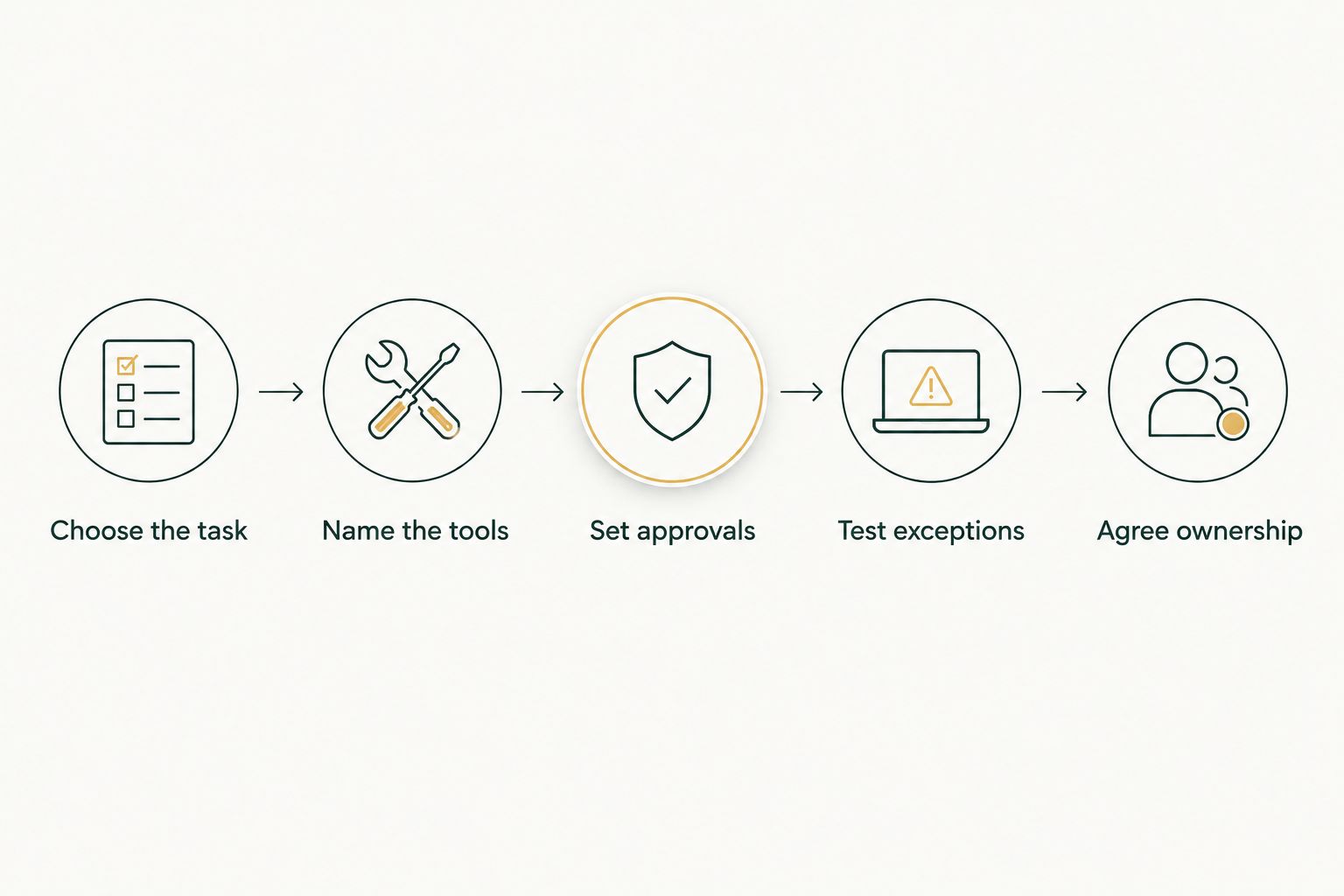
Once that brief is written, ask each provider to respond against it directly. Keep assumptions and exclusions beside the proposed work, not buried in a separate conversation.
Where does Bizzy fit?
Consider Bizzy for professional-service teams seeking an AI colleague for internal workflows. Its stated work includes inbox tasks, scheduling, administrative follow-ups, and reminder coordination through integrations with a company’s existing tools.
That is relevant when your law firm wants help carrying out day-to-day work rather than another place to manage a task list. The fit still depends on the particular assignment and the boundaries you agree to.
Evaluate the benefit and the limit together. An internal-workflow offering matches an operational brief; it does not, by itself, establish that a particular legal task, tool connection, or approval arrangement is included.
Ask for a proposal built around your actual handoff. Keep the initial assignment understandable enough that both the person delegating the work and the person reviewing it agree on what completion means.
Does paying for an assistant remove the need for review?
Keep review responsibility in your operating plan. For a law firm, the proposal should distinguish administrative execution from decisions your team must make.
Ask what happens before a message leaves the firm, a calendar entry changes, or a draft becomes a document someone relies on. Then assign a reviewer to each relevant point.
This is also how you assess the workload honestly. Track the time spent briefing, reviewing, correcting, and handling exceptions alongside the work the assistant completes; evaluate the whole handoff rather than the draft alone.
Should you automate several workflows at once?
Expand only after the first workflow has clear acceptance criteria and an agreed exception path. Adding inbox work, scheduling, and drafting to the same brief creates more responsibilities to define.
A broader assignment is not automatically a better assignment. If your team cannot explain who owns each handoff, narrow the scope before approving implementation.
Use the first workflow to establish how instructions change and how problems reach the right person. Apply that operating discipline to the next assignment instead of starting over with another vague request.
FAQ
What should a scoped law-firm assistant quote include?
Get an itemized quote for your law firm’s specific workflows, tool connections, and review requirements. Compare implementation, ongoing service, and internal review effort rather than treating a headline subscription as the complete budget.
What should a law firm include in an AI assistant budget?
Include implementation, ongoing service, and your team’s time for briefing, review, and exceptions. Ask the provider to state how workflow changes and handover are handled.
What is the best task for a law firm to automate first?
Choose an administrative task with clear inputs, a defined endpoint, and a named reviewer. Inbox follow-ups or scheduling are candidate scopes when your team can explain the rules and exceptions.
Can an AI assistant send emails without approval?
Make sending authority an explicit part of the agreement rather than assuming it is included or disabled. Define which actions require approval and who provides it before the workflow starts.
Is Bizzy relevant to law firm administration?
Bizzy serves professional-service teams, including law firms, with an AI colleague for internal workflows. Its stated scope includes inbox work, scheduling, administrative follow-ups, and reminder coordination through existing company tools.
How do I compare proposals from different providers?
Give each provider the same workflow brief and require a response against the same responsibilities. Compare the endpoint, required access, approval gates, exception handling, and ongoing ownership alongside the commercial terms.
Does an AI assistant replace legal review?
Do not treat an assistant’s draft as an approved legal document. Keep responsibility for checking facts, instructions, and legal content explicit in the workflow.
One last thing
Ask the provider to explain when the assistant should stop. A polished example shows how work moves forward; an exception shows whether the proposed boundaries are clear.
Before accepting a 2026 proposal, put a conflicting instruction or missing input into the discussion. Agree on who receives the handoff, what information accompanies it, and who restarts the work after the issue is resolved.
That gives you a better buying decision than a long feature list. You are hiring help for a defined job—make the job, the limits, and the ownership clear before committing.