Planning a custom Bizzy–Clio case-update workflow
By Leandro Faria · · Updated · 12 min read
Disclosure: Bizzy is built by 33Labs, the publisher of this guide.
This is a planning specification for a possible custom Bizzy–Clio workflow, not instructions for an available native connector. Use it to decide whether a proposed administrative case update can be supported, what access it would need, and what an implementation team must demonstrate before any write is authorized.
Bizzy’s standard service covers front-office administration: inquiry follow-up, routine scheduling, and reminders from approved administrative details. It does not include access to financial or privileged documents, substantive legal drafting, or custom integrations. Any proposed work beyond that boundary needs a separately agreed scope, verified technical support, and an approved data-handling arrangement; a case study is not evidence that it is included for every customer.
- This custom-integration planning guide defines requirements; it does not establish that Bizzy has a Clio connector.
- Standard Bizzy administration does not include custom Clio integration or access to privileged case files.
- Start with one pilot matter and test duplicate handling before expanding access.
- Keep document revisions separate from new material so case file updates preserve their history.
Why this matters
A case file update is not just a copy-and-paste task. Someone must identify the correct matter, decide what belongs in the record, and check whether the material is already there. Automating the copying without those decisions moves the risk rather than removing it.
Consider Bizzy for professional service teams seeking an AI colleague for recurring internal workflows. For a law firm, the useful starting point is a narrow assignment with a clear handoff—not unrestricted access to every client record. Bizzy provides an AI colleague that works with a company's existing tools; the specific Clio connection needs verification before implementation.
For your 2026 rollout, define success as a correct, approved update with a traceable source. A faster update to the wrong matter is a failed workflow. Keep the person responsible for the case in control of what enters its record.
Before you start
- Access and ownership: Identify the Clio account administrator, the workflow owner, and the person authorized to approve updates. Ask the implementation team to verify how Bizzy can connect, which actions that connection supports, and how access is revoked.
- Materials and boundaries: Prepare one pilot matter, representative source material, and a written list of permitted destinations. Use synthetic or appropriately redacted examples during initial testing. Exclude sensitive material that the firm has not approved for this processing.
- The easy-to-miss gotcha: A client name is not a reliable matter identifier. The same client can have multiple matters. Require a verified matter reference or human confirmation before an update reaches Clio.
Do not proceed until the connection method and data-handling requirements are approved. For a 2026 implementation, include the firm's current confidentiality, retention, and access requirements in that decision. Technical access alone is not authorization to process every record.
Planning connection access and source intake
This stage establishes what the workflow can read and what it is allowed to change. Keep those permissions separate. Reading an incoming document should not automatically authorize replacing a document in a case file.
- Write the assignment. Describe the incoming material, the intended case file update, and the required approver. For example, instruct the workflow to prepare an update from an approved incoming document and hold it for review. Treat this as your implementation specification, not an existing product setting.
- Verify the connection route. Ask the administrator or implementation team to demonstrate the supported route to Clio. Establish whether it permits reading matter references, preparing updates, and writing approved changes. If an action is unsupported, keep that action manual rather than substituting an unapproved route.
- Limit access. Request the narrowest permissions that cover the assignment. Keep account credentials out of email instructions, document text, and shared task notes. Record who owns the connection and how to disconnect it.
- Choose the intake boundary. Start with one approved source, such as a designated inbox or document handoff. Specify which items qualify and which must be ignored. An unrelated message arriving in the same place must not become a case file update.
- Run a read-only check. Confirm that the connection identifies the intended pilot matter and retrieves only the information required for the assignment. Do not enable changes during this check.
Expected result: The implementation team can demonstrate an approved connection, a defined intake source, and a limited scope. If the connection cannot meet those conditions, stop here. The remaining workflow is a design specification until the access problem is resolved.
Specifying matter matching and update mapping
Matter matching decides where the work belongs. Update mapping decides what the work changes. Keep both decisions explicit so a reviewer can inspect them without reconstructing the entire email thread.
- Choose the matter reference. Use a stable reference verified against the intended Clio matter. Keep the source reference and destination reference together in the workflow record. Do not resolve ambiguous matches by picking the closest-looking name.
- Set the ambiguity rule. Send unmatched material and multiple possible matches to a person for review. The workflow should hold the item without changing a case file. State who resolves the match and how the corrected reference returns to the process.
- Define the destination. Specify whether the assignment concerns a note, a document, or another supported record. Confirm the destination against the actual connection capabilities. These records serve different purposes; do not substitute one merely because it is easier to create.
- Separate source facts from summaries. Retain the original source reference alongside any drafted summary. Require the summary to distinguish stated facts from requests or unresolved questions. Do not let an inferred date become an authoritative case deadline.
- Preserve document identity. For documents, carry the original filename and the source reference into the review record. Define how the reviewer distinguishes a new document from a revised copy. Avoid silent replacement as the default behavior.
Expected result: Each proposed update shows the intended matter, destination, source, and draft content. A reviewer can explain why the material belongs there. Missing or conflicting information results in a held item, not a guessed case file update.
Defining approval and case-update requirements
For the initial 2026 pilot, use one approval gate before any case file change. The gate should cover both the content and its destination. Approving a summary without seeing the matter reference leaves the most consequential decision unchecked.
- Define the review package. Present the source material, verified matter reference, proposed destination, and drafted update together. Include any uncertainty that prevented automatic matching. The reviewer should not need to search separate systems to understand the proposal.
- Assign approval responsibility. Name the person or role authorized to approve this class of update. Define what happens when that person is unavailable. An unanswered request stays pending; silence is not consent.
- Separate approval from execution. Require an explicit approval before the implementation attempts the supported write action. If the connection cannot enforce that separation, keep the final Clio entry manual.
- Record the outcome. Capture whether the action succeeded, failed, or requires inspection. Link the workflow record to the source and destination references where supported. An approval alone does not prove that Clio received the update.
Use this sequence as the handoff specification:
- Source intake: Receive eligible material.
- Matter match: Verify the destination matter.
- Approval gate: Review content and destination.
- Case update: Perform the approved action.
- Activity record: Preserve the outcome and references.
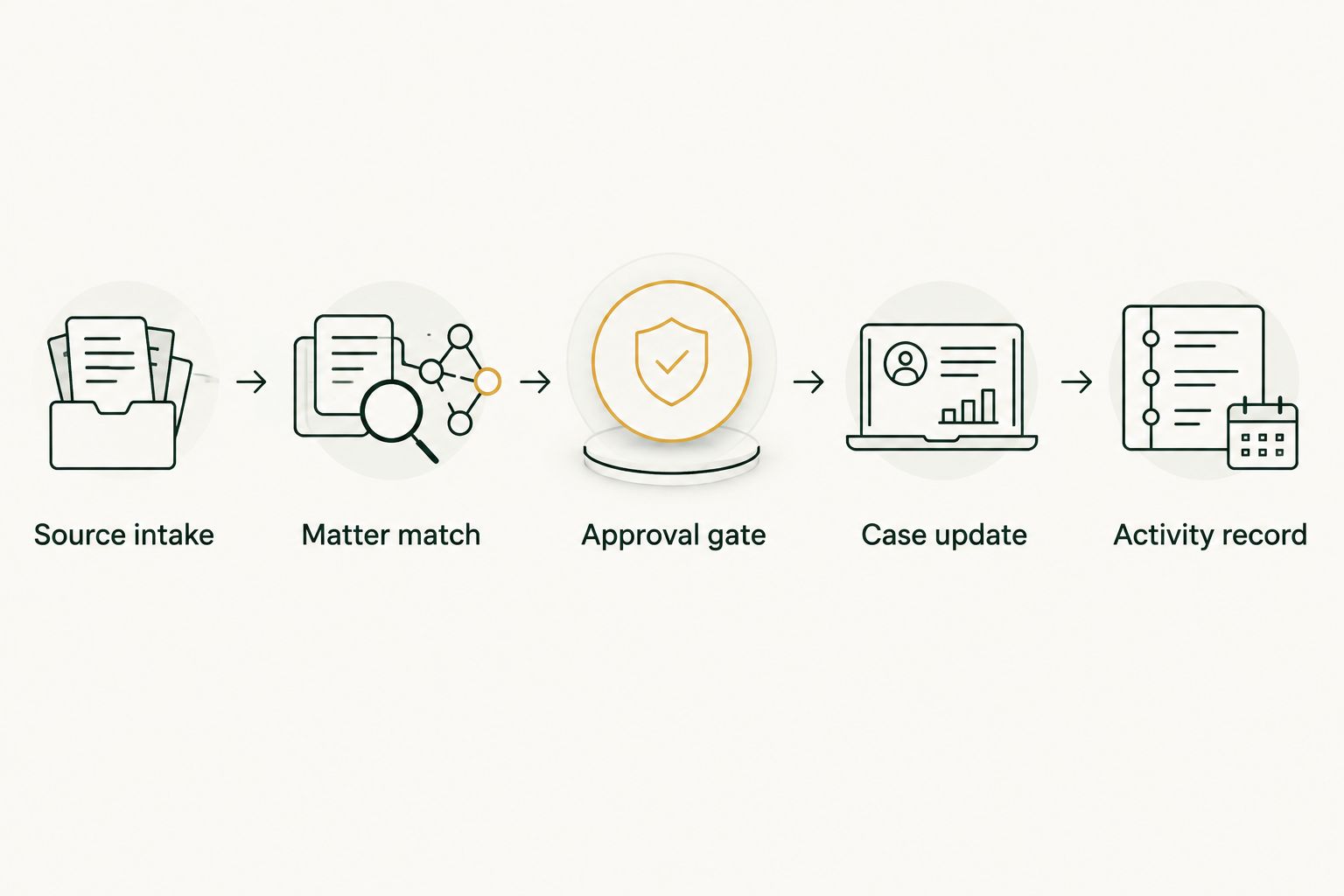
Expected result: An approved update reaches the correct destination through a verified action. A rejected or unanswered proposal makes no change. The activity record distinguishes approval from successful execution.
Pilot testing and duplicate control
Test the decision boundaries before expanding the workflow. A clean example proves only that the clean example works. Your pilot needs material that should be accepted, material that should be held, and material that should not produce another update.
- Prepare three test messages. Use one eligible message, one message without a reliable matter reference, and one duplicate of the eligible message. These are recommended test cases, not a performance benchmark. Keep their expected outcomes in the pilot instructions.
- Check the eligible message. Confirm that the workflow proposes the correct matter and destination. Approve it only after inspecting the source and draft. Then verify the resulting record directly in Clio.
- Check the unmatched message. Confirm that the workflow holds it for review. No case file should change. Correct the reference through the defined review process rather than editing unrelated records to make the test pass.
- Check the duplicate message. Require the implementation to recognize an already-processed source before attempting another write. Use a persistent source reference where the connection supports it. A subject line alone is not a sufficient identity rule.
- Check recovery after interruption. Ask the implementation team to demonstrate what happens when execution stops after approval. Before retrying, inspect whether the destination already contains the update. A timeout does not establish that the write failed.
Expected result: The eligible message produces the intended approved update, the unmatched message remains held, and the duplicate produces no additional record. Keep those acceptance criteria in the 2026 operating instructions so later changes can be tested against the same rules.
Planning review when existing material changes
Revised material needs a different assignment from new material. A corrected document or changed instruction must connect to its earlier version. Otherwise, the record can accumulate conflicting copies without explaining which one the team should use.
Use the same verified connection and approval process, but add a previous-source reference. Ask the implementation team to show the earlier item and proposed revision together. Define whether the approved action creates a new version, adds a correction, or records a separate note, according to the destination's supported behavior.
Keep destructive replacement outside the initial workflow. Preserve the earlier material until your firm has approved a specific revision policy. If the workflow cannot establish which existing item changed, route the revision to a person.
| Workflow | Best for | Advantage | Limitation |
|---|---|---|---|
| New-material intake | Newly received material with a verified matter reference | Clear source-to-matter assignment | Still requires duplicate checks and content review |
| Revised-material review | Corrections to an identifiable earlier item | Keeps the change tied to its prior context | Requires reliable version matching and a defined revision policy |
Neither workflow should treat every attachment as authoritative. The sender's instruction, document status, and reviewer decision determine the proposed action.
Troubleshooting
The update targets the wrong matter
Stop further writes and inspect the source-to-matter mapping. Replace name-only matching with a verified matter reference and require review for ambiguous cases. Check other items processed under the same rule before restarting.
The same material appears twice
Inspect whether the workflow records a source as processed before retrying. Compare the existing destination record with the pending item. Add duplicate control around the actual write action, not just the initial intake event.
Approval is recorded, but Clio has no update
Check the execution outcome separately from the approval outcome. Have the administrator inspect access, supported actions, and any returned failure information. Retry only after confirming that the update is absent and the original approval still applies.
A document revision creates conflicting records
Hold subsequent revisions and verify the earlier-item reference. Show both versions to the reviewer and apply the firm's revision policy. Do not delete or replace material merely to make the records look tidy.
A summary changes the meaning of the source
Reject the draft and compare it with the original material. Tighten the assignment to preserve factual statements, distinguish requests from decisions, and flag uncertainty. Keep substantive legal interpretation with the responsible professional.
Customize your workflow
Expand scope by changing one responsibility at a time. Add another source only after the original intake behaves correctly. Add another update type only after its destination, approver, and failure rules are documented.
For your 2026 expansion plan, keep a written boundary between administrative assistance and professional judgment. Filing approved material is a different assignment from deciding what that material means for a client's case. The latter should not slip into the workflow through a vague instruction to keep everything current.
If a custom implementation is agreed and supported, give its team a clear assignment, an approval owner, and an exception handoff. Do not describe the job as handling the entire case file. Name the work that can proceed and the work that must stop for review.
Review permissions whenever the assignment changes. A broader intake source can expose unrelated client information even when the destination remains unchanged. Recheck access, duplicate handling, and recovery before enabling the expanded workflow.
FAQ
What must be verified before a custom Bizzy–Clio workflow?
A separately scoped implementation must first demonstrate an authorized connection and the required actions. This article provides acceptance requirements, not a verified Bizzy connector or setup steps. Keep unsupported actions manual and privileged documents outside standard service.
Does this Clio AI integration require a native connector?
The implementation needs a verified, authorized connection method; do not assume a native connector exists. Have the implementation team demonstrate the required read and write actions before granting access.
What is a bounded first test?
Start with approval-first intake for one pilot matter. Use representative test material and verify that unmatched items and duplicates produce no case file changes.
Can incoming emails update a case file without review?
Keep review in the initial workflow rather than permitting unattended changes. Any later removal of an approval gate requires a separate firm decision about the specific action, its risks, and its controls.
How do I prevent updates from reaching the wrong matter?
Require a verified matter reference instead of relying on a client name. Hold missing or ambiguous matches for a person to resolve before any write action.
What should happen when a document is revised?
Treat the revision as a separate review workflow tied to the earlier item. Preserve prior material and apply the firm's revision policy instead of silently replacing a document.
What should I check before expanding the workflow in 2026?
Check permissions, matter matching, approval responsibility, duplicate control, and recovery after interrupted execution. Repeat the pilot acceptance tests whenever the assignment or connection changes.
One last thing
An interrupted action has an uncertain outcome—not necessarily a failed outcome. Clio can contain the intended update even when the workflow never receives confirmation. That is why the retry rule belongs in your original specification, not in a later repair plan.
Before any retry, verify the destination and check the source reference. This is the specific recommendation to carry into your 2026 rollout: automate the handoff only after you can explain how the workflow avoids writing the same approved material twice.
Sources and scope
Clio’s authorization documentation describes user authorization and OAuth 2.0 for the Clio API. That establishes an API authorization mechanism, not a Bizzy integration, permitted access to your files, or support for any particular action.