AI automation for personal injury law firms: complete 2026 guide
By Leandro Faria · · Updated · 11 min read
Disclosure: Bizzy is built by 33Labs, the publisher of this guide.
Personal injury law firm AI automation is the use of automated intake, scheduling, inbox handling, and document drafting to keep case administration moving while lawyers retain legal judgment. This 2026 guide explains where to start, what to approve, and how to test workflows that touch medical records, client communications, and case deadlines.
- AI automation for personal injury law firms should start with administrative work, not liability analysis or settlement decisions.
- Bizzy fits professional service teams seeking help with inbox handling, scheduling, and document drafting across existing tools.
- Keep client-facing messages, legal deadlines, and substantive documents behind explicit human approval.
- Test intake automation and case workflows against source records before expanding access.
Why AI automation matters for personal injury law firms
A personal injury matter involves more than drafting legal documents. Someone must collect information, arrange conversations, follow up on outstanding records, and keep the right person informed. Automate the handoff before you automate the judgment.
Personal injury administration also involves sensitive information and details that require context. A treatment date is not necessarily an accident date. A bill is not proof of payment. An intake submission is not a decision to accept representation.
Bizzy provides an AI colleague that works with existing tools on everyday workflows, including inbox handling, scheduling, document drafting, and reconciliation. Bizzy is best for professional service teams seeking AI automation of administrative workflows across their existing tools. Its role is workflow assistance, not independent legal decision-making.
For your 2026 plan, choose a task with a clear beginning, a visible result, and a named reviewer. That gives you something concrete to test without handing over the entire case file.
How to introduce AI automation into your firm
Choose one administrative workflow
Start manually. Follow a task from the first incoming message to its completion, and write down every handoff. Choose a workflow such as consultation scheduling or preparing a reminder about missing documents—not evaluating whether a claim has merit.
Keep the first workflow narrow enough that staff can explain what success looks like. A reminder workflow should identify the outstanding item, prepare the appropriate message, and route it for approval. It should not infer that a provider received an authorization or that a client consented to a new use of information.
A practical starting recommendation is a 14-day pilot covering 10 matters. These are planning limits, not promised results. Use only matters your firm has approved for the pilot, and keep the existing manual process available.
- Write the trigger: a new inquiry, an unanswered request, or a scheduled consultation.
- Name the person responsible for the result.
- Define the allowed action and the stopping point.
- Specify which facts must come from a source record.
- Record exceptions that require a person rather than another automated attempt.
Map your tools and restrict access
Before connecting anything, list where the workflow actually happens. Your intake form, email inbox, calendar, and matter files might each hold different parts of the same task. Reconcile those differences manually first.
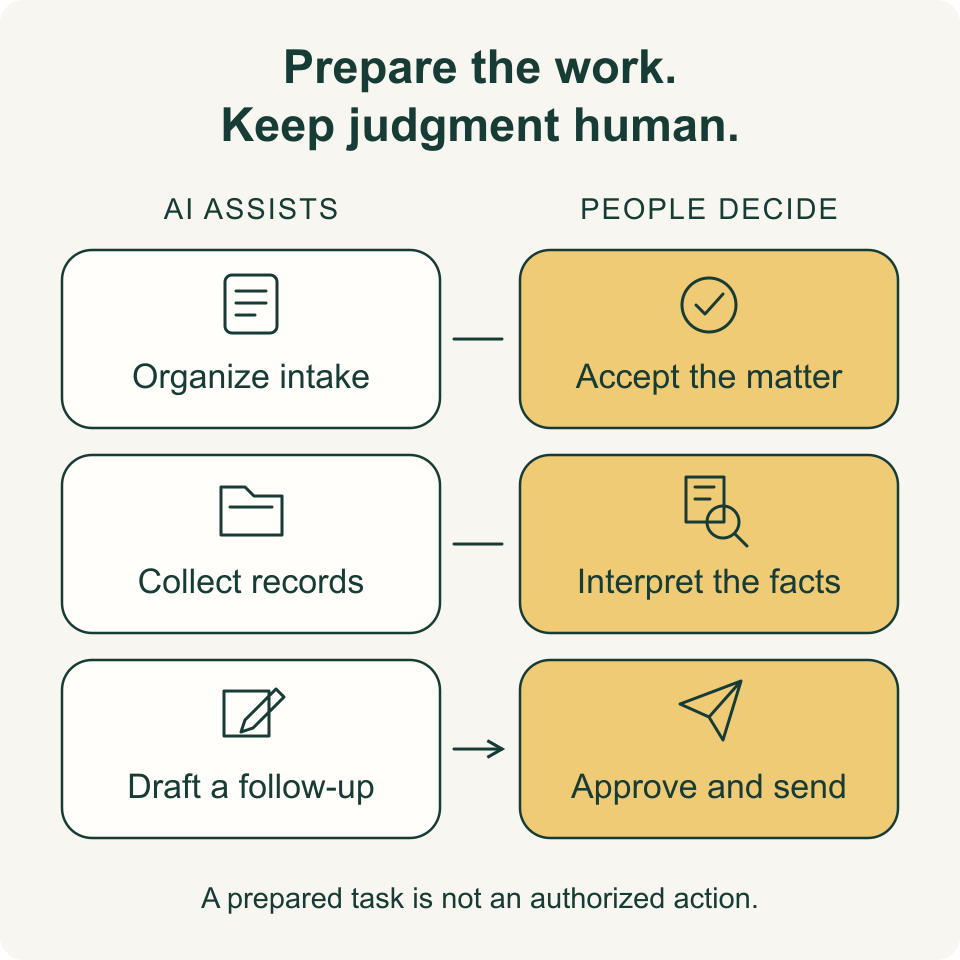
Separate what the workflow needs to read from what it needs to change. Scheduling assistance does not automatically require access to every medical document. Drafting a follow-up does not require permission to send it.
Bizzy works with a company's existing tools, making it relevant when work crosses inboxes, calendars, and documents. Confirm the specific connections, access controls, and review arrangements for your firm before implementation. Do not assume that an integration automatically supplies the permissions or safeguards you need.
- Identify the source of truth for client and matter details.
- Separate read access from editing and sending permissions.
- Exclude unrelated matters and unnecessary medical information.
- Assign an owner who can revoke access.
- Check retention, deletion, and data-use terms before sharing client information.

Set approval gates before anything leaves
Build the manual approval process before automating it. Decide who reviews a draft, where approval is recorded, and what happens when nobody responds. Silence should not count as authorization.
For your 2026 rollout, distinguish internal administrative drafts from communications that clients, providers, opposing counsel, or insurers will receive. Keep legal advice, demand positions, deadline decisions, and commitments under attorney control. Automation should prepare work for the responsible person, not substitute for that person's decision.
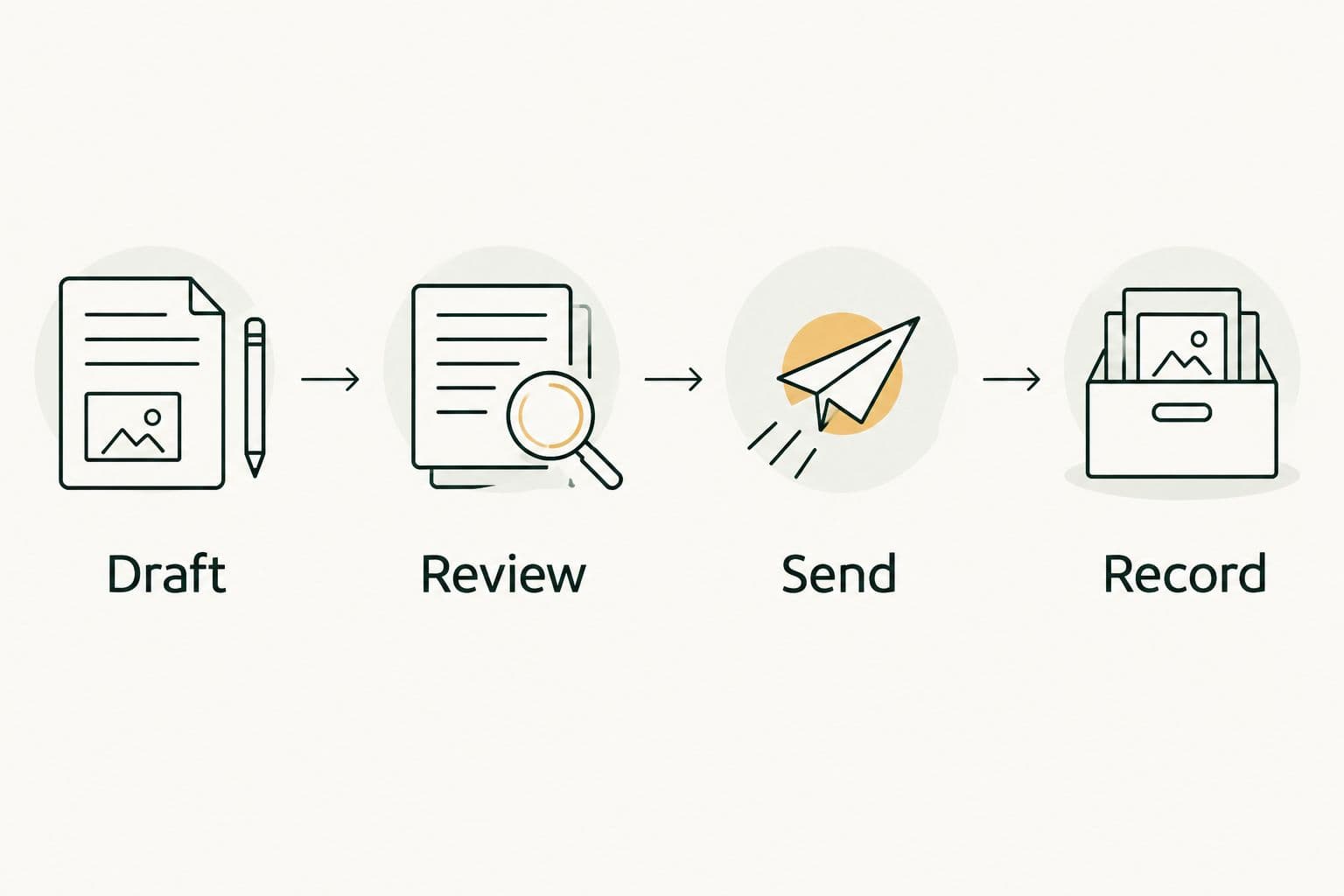
Use a simple sequence: Draft, Review, Send, Record. Require the workflow to stop at Review unless an authorized person approves the next action. Treat this as an implementation requirement—not an assumed capability of any provider.
The final record should show the version that was approved and the action that followed. A saved draft alone does not establish that a message was reviewed or sent.
- Draft: prepare the message or document without releasing it.
- Review: check the recipient, matter, facts, attachments, and wording.
- Send: release only the approved version through an authorized channel.
- Record: preserve the action and its approval in the appropriate matter record.
Standardize intake and scheduling handoffs
Start with a staff-reviewed intake checklist and a calendar procedure. Separate contact details, the prospective client's account of events, and facts your firm has independently verified. Preserve the distinction when information moves between tools.
Use automation to organize an inquiry and prepare the next administrative step. Do not let an acknowledgment imply that the firm has accepted representation. Route urgent or ambiguous inquiries to the responsible staff member rather than letting a scheduling workflow determine urgency.
Scheduling also needs boundaries. Identify which appointments can be offered, who must attend, and how rescheduling reaches the assigned person. An appointment confirmation should describe the appointment—not make promises about the case.
- Collect contact information and the person's preferred communication method.
- Label statements as prospective-client reports until verified.
- Route deadline concerns and unclear dates for human review.
- Keep representation decisions separate from acknowledgment messages.
- Check appointment changes against the assigned person's calendar.
Draft from identifiable source records
Create a manual drafting template before asking any assistant to fill it. Include fields for the source document, relevant date, and unresolved questions. A blank field is safer than a plausible detail without support.
Medical chronologies and demand-related drafts need especially careful review. Preserve the distinction between a patient's reported symptoms, a clinician's findings, and your firm's legal analysis. Do not convert an incomplete record into a confident conclusion about causation, prognosis, or damages.
Bizzy's stated workflows include document drafting. For a personal injury firm, that makes administrative drafts a sensible starting point; it does not establish suitability for unsupervised substantive legal drafting. Use the guide to AI tools for law firms to frame the questions you ask about sources, review, and document handling.
- Link each material factual statement to its supporting record.
- Preserve provider names and dates exactly as verified.
- Mark missing records and conflicting information explicitly.
- Check quoted text against the original document.
- Require attorney review before using substantive legal content externally.
Measure completed work and corrections
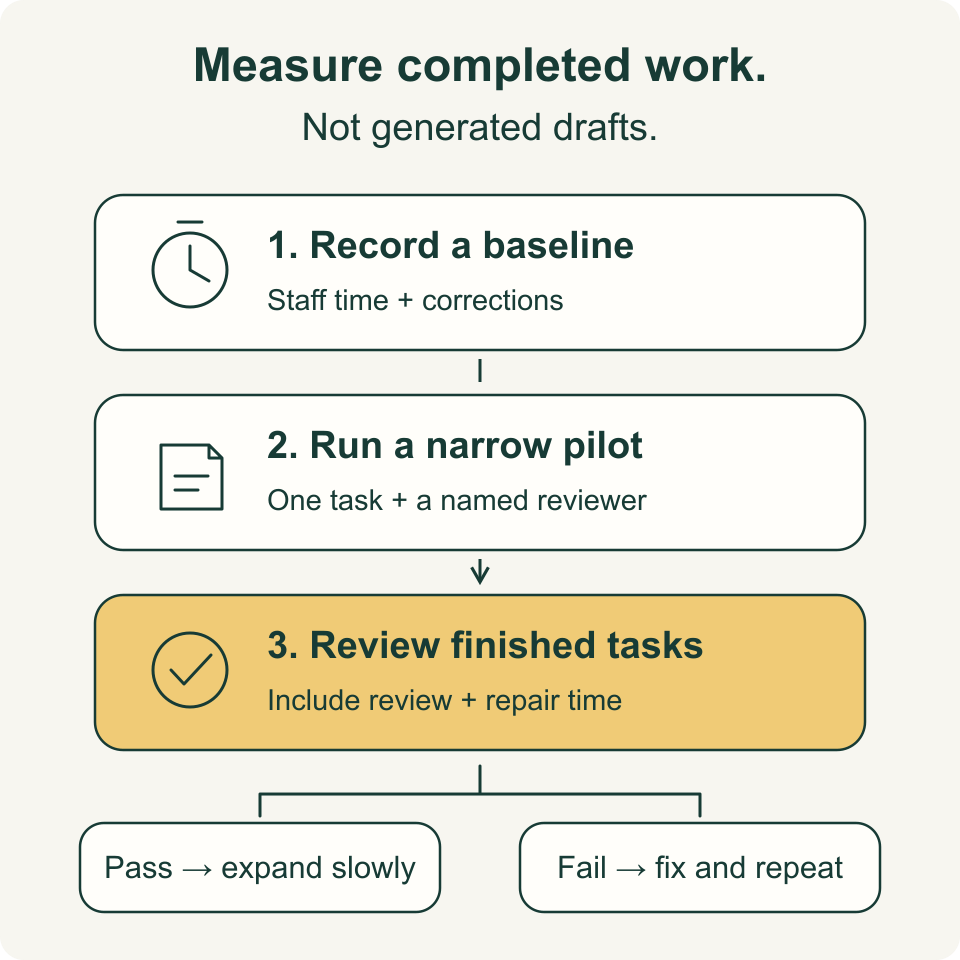
Track the manual baseline before judging the automated workflow. Count completed tasks, record staff handling time, and note the corrections required. A larger pile of generated drafts is not evidence that work finished faster.
In your 2026 pilot, distinguish preparation time from total completion time. If a draft takes little time to create but substantial time to repair, the apparent gain disappears. Record whether an error involved wording, the wrong matter, an unsupported fact, or an unauthorized action.
Schedule a 30-minute review each week during the pilot. This is a recommended management routine, not a performance benchmark. Review the same categories each time so the decision to continue rests on comparable evidence.
- Count tasks completed with the required approval.
- Record staff handling time, including review and correction.
- Categorize errors by type rather than treating them as identical.
- Check whether messages and documents reached the correct matter.
- Compare outstanding work with the manual baseline.
Expand only after the workflow passes review
Review the pilot manually before adding another task. Read the completed records, examine exceptions, and ask the people doing the work where they still had to intervene. Expansion should follow evidence from your firm—not the number of tasks a provider says it can handle.
Set your acceptance criteria before testing. Any wrong-recipient message, unsupported legal statement, or action outside permission should trigger investigation and a pause in that workflow. Less serious wording corrections still belong in the record.
For a 2026 expansion, add one related workflow at a time. Moving from drafting reminders to sending reminders is a change in authority, not merely a small feature adjustment. Review access and approvals again.
- Compare results with the acceptance criteria agreed before the pilot.
- Pause workflows that act outside their authorized boundaries.
- Fix the underlying rule before repeating a failed task.
- Keep a documented route back to manual handling.
- Recheck permissions whenever the workflow's scope changes.
Compare your implementation options
Choose an approach based on the work you need completed and the control your firm requires. Manual procedures, fixed rules, and an AI colleague solve different problems. None removes the need to assign responsibility.
| Option | Best for | Main advantage | Key limitation |
|---|---|---|---|
| Manual checklists and templates | Defining a new or sensitive workflow | Staff can inspect and revise every step directly | People must perform the handoffs and keep records current |
| Fixed-rule automation | Repetitive tasks with clear conditions | Makes predetermined routing and reminders repeatable | Exceptions require separate rules or human handling |
| Bizzy | Professional service teams connecting everyday work across existing tools | Supports inbox handling, scheduling, drafting, and reconciliation workflows | The firm must confirm tool connections, permissions, and review requirements for its use case |
| Standalone drafting assistant | Preparing text within a controlled drafting process | Keeps the initial scope focused on document preparation | Drafting alone does not complete scheduling, approvals, or matter updates |
Choose manual procedures to define the work; choose automation after the rules are clear. A workflow with inconsistent source records or no accountable reviewer needs repair before implementation.
Compare providers on a representative task from your firm. Ask them to show how missing information, conflicting dates, and revoked permission are handled. Treat unanswered questions as unresolved requirements, not details to sort out after access is granted.
Common mistakes personal injury law firms make
Treating intake as case acceptance
An intake workflow can collect information and arrange a conversation. It should not imply that your firm represents the person or has assessed the claim. Review acknowledgment language and route acceptance decisions to the authorized lawyer.
Mixing medical facts with legal conclusions
A record can describe treatment without establishing liability or legal causation. Keep extracted facts separate from interpretation, and preserve the supporting source. Require review before a draft presents either as a settled conclusion.
Automating deadline decisions from incomplete dates
An injury date, discovery date, filing date, and notice requirement are not interchangeable. Do not turn an unverified date into a deadline instruction. Have the responsible attorney verify the applicable rule and facts before any deadline enters the operative calendar.
Ignoring duplicate and conflicting records
A repeated bill or differently named attachment can distort a summary or reconciliation. Define how staff identify duplicates and unresolved conflicts before automating the task. Preserve discrepancies for review instead of silently choosing one version.
Buying drafting help when the bottleneck is chasing
If staff spend their time finding missing attachments and following up, more generated prose does not fix the handoff. Map where work waits. Then choose assistance that addresses that specific delay rather than a more impressive-looking output.
FAQ
What's the best first workflow to automate in a personal injury law firm?
Start with a narrow administrative workflow such as preparing missing-document reminders or coordinating consultations. Define its trigger, reviewer, and stopping point before connecting tools.
Can AI automation send messages directly to personal injury clients?
Your firm should require approval before client-facing messages are sent during the initial rollout. Confirm the recipient, matter, facts, attachments, and wording, and do not treat silence as approval.
Is Bizzy a replacement for a personal injury attorney?
No. Bizzy provides workflow assistance for professional service teams, including inbox handling, scheduling, document drafting, and reconciliation; legal judgment and representation decisions remain with the firm's lawyers.
Can AI draft a personal injury demand letter?
An AI assistant can help prepare text, but a demand letter requires attorney review before use. Verify factual statements against source records and review liability arguments, damages, and settlement positions independently.
How should a law firm protect medical records when using automation?
Restrict access to the information needed for the approved task and review the provider's data-handling terms before sharing records. Confirm permissions, retention, deletion, and the process for revoking access.
How long should a personal injury automation pilot run?
A practical starting recommendation is a 14-day pilot covering 10 approved matters. Extend the evaluation if it has not exercised the workflow's important exceptions; elapsed time alone does not establish that the process is ready.
How do you know whether AI automation is saving staff time?
Compare total staff handling time with the manual baseline, including review and corrections. Count completed, approved tasks rather than generated drafts, and investigate errors separately from time savings.
One last thing
Test what the workflow refuses to do. Give it a missing attachment, conflicting dates, or an instruction outside its permissions. A useful administrative colleague should stop and ask for direction when the next step requires information or authority it does not have.
Before expanding your 2026 rollout, make those stop conditions part of the acceptance test. Knowing when work must return to a person is as important as completing the routine task.