Can AI handle scheduling for real estate agents?
By Leandro Faria · · Updated · 10 min read
Disclosure: Bizzy is built by 33Labs, the publisher of this guide.

Yes—AI can handle scheduling for real estate agents when it has authorized calendar access, clear booking rules, and a way to confirm appointments with everyone involved. It can coordinate routine requests, but a calendar opening does not establish property access, seller permission, or an agent’s ability to reach the next showing.
- Can AI handle scheduling for real estate agents? Yes—automate routine coordination, not assumptions about property access.
- Require confirmation before treating a showing request as a booked appointment.
- Bizzy supports scheduling and other internal workflows for professional service teams, including real estate.
- Keep approval gates for unclear instructions, access problems, and exceptions to your booking rules.
Can AI handle scheduling for real estate agents?
AI can coordinate appointments; it should not invent permission to book them. Give the assistant access to the information it needs, define what it can change, and specify when it must ask you. That distinction separates useful scheduling help from a calendar full of unconfirmed commitments.
For a 2026 implementation, start by deciding which work you want delegated. Suggesting a meeting time, collecting a seller’s approval, and confirming a showing are different tasks. Each needs its own completion rule.
Bizzy provides an AI colleague that works with a company’s existing tools on scheduling and other internal workflows. Evaluate any proposed setup against your actual calendar, inbox, and appointment process—not a generic booking demonstration.
| Scheduling approach | Best for | What it handles | Main limitation |
|---|---|---|---|
| Human coordination | Exceptions and sensitive conversations | Interpreting requests, negotiating changes, checking unusual circumstances | Someone must keep track of every exchange |
| Booking links | Appointments with predictable rules | Letting invitees choose from offered times | An open slot does not establish property access or seller consent |
| AI-assisted coordination | Requests involving inbox conversations and calendar rules | Interpreting requests and coordinating times within authorized connections | Missing information and unclear permissions still require review |
These approaches can work together. A booking link can handle a straightforward introductory call, while an assistant coordinates an email exchange and a person resolves an access dispute.
Why this matters
Real estate scheduling involves more than finding an empty square. A showing can depend on the buyer, the agent, the seller, the property’s access arrangements, and another agent’s response. If any required participant has not agreed, the appointment is still a request.
The practical goal is to reduce chasing without losing control. You want someone—or something—to follow the conversation, identify what is missing, and bring you a clear exception instead of another vague reminder.
Delegate the coordination before you delegate the commitment. That keeps your first scheduling workflow narrow enough to inspect and correct.
What can AI take off an agent’s calendar workload?
The useful tasks are the ones with explicit inputs and an observable finish. Before assigning any task, confirm that the chosen implementation supports the necessary tools and permissions.
Collecting appointment details
A scheduling workflow can gather the requested property, attendees, preferred times, appointment type, and contact details. It should ask for missing information rather than fill gaps from an unrelated conversation.
For example, a request to see a property after work is incomplete. The assistant needs an actual day and an acceptable time window before it can compare the request with your calendar.
Proposing suitable times
With authorized calendar access, the workflow can check recorded availability against your booking rules. Those rules should cover working hours, appointment length, travel buffers, and calendars that block new appointments.
The limitation is straightforward: unrecorded commitments remain invisible. If your personal appointment or inspection visit is not on a calendar the workflow checks, do not expect it to protect that time.
Tracking confirmations and changes
A defined workflow can distinguish a proposed time from an accepted appointment and track responses in the connected conversation. Reminders and change notices require their own supported communication channels and instructions.
Do not treat silence as acceptance. Specify whose response counts, what language confirms the booking, and what happens when someone asks to move it.
How should you set up AI scheduling for real estate?
Use the following sequence for your 2026 setup. These are implementation requirements to establish, not promises that every assistant supplies them automatically.
- Choose the appointment. Start with a clearly defined appointment type, such as a buyer consultation. Write down who attends, what information is required, and what makes the appointment confirmed.
- Set calendar access. Identify the calendars that determine availability and the calendar that receives new events. Separate permission to read availability from permission to create or change appointments.
- Define booking rules. Record working hours, appointment lengths, travel buffers, location requirements, and cancellation instructions. State which rules the assistant must never override.
- Require confirmation. Name the people whose approval is necessary. Keep tentative requests visibly separate from appointments that meet every requirement.
- Review exceptions. Send unclear requests, conflicting replies, and access problems to a named person. Give that person the conversation and the unresolved question, not just an error message.
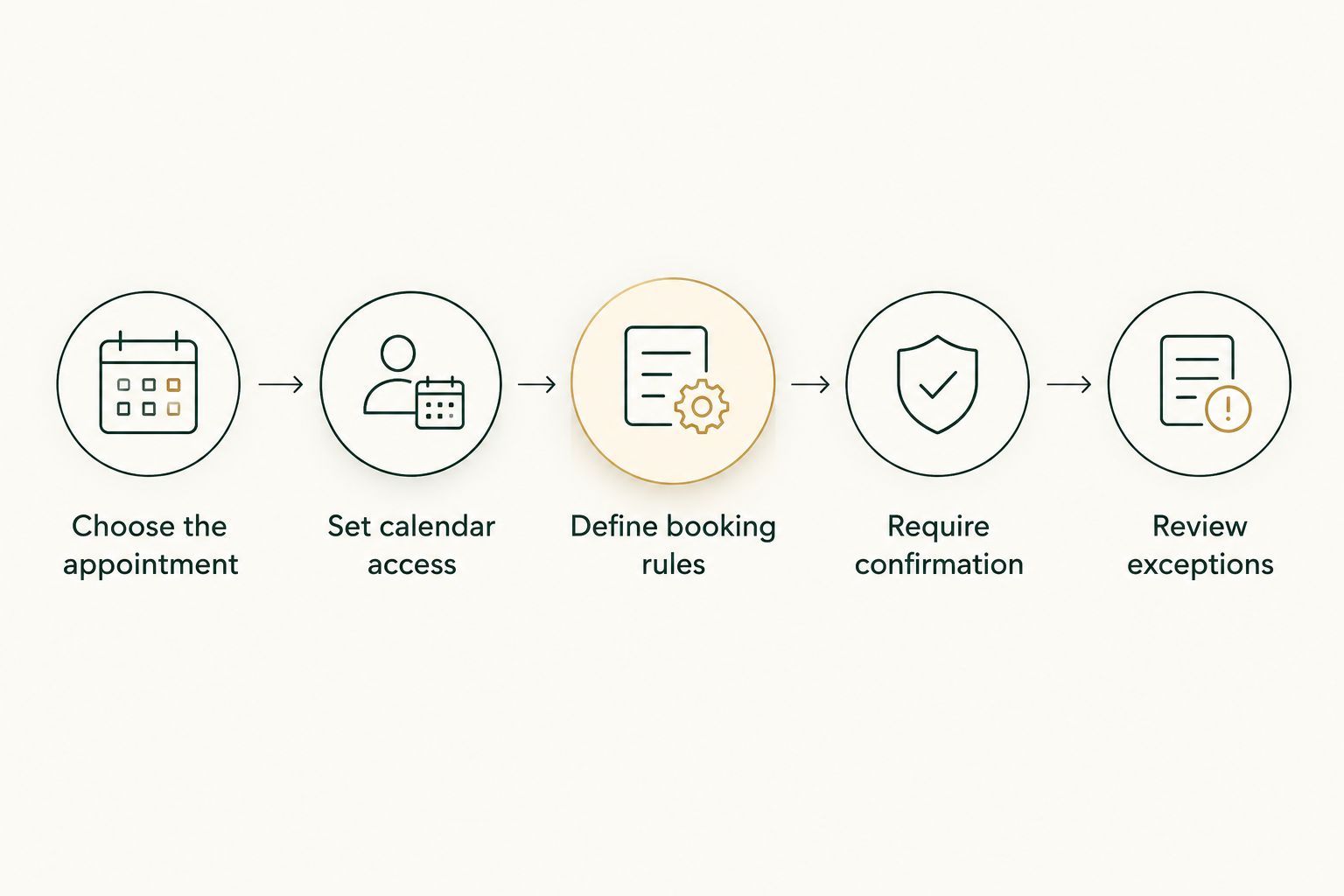
Before enabling live changes, walk through sample requests with the person who normally manages scheduling. Include an incomplete request, a cancellation, a conflicting reply, and a property-access question. Check the actual event and outgoing message, not just the assistant’s description of what happened.
A useful test ends with a decision: the workflow books correctly, asks a necessary question, or stops for approval. If you cannot tell which outcome occurred, tighten the process before expanding it.
Why AI scheduling results vary
The deciding factors are not limited to how well an assistant understands a message. Scheduling succeeds when the information, authority, and completion rules agree.
- Calendar coverage. The workflow needs the relevant commitments, not just your main work calendar. A missing calendar creates an incomplete view of availability.
- Property requirements. Seller permission, occupancy arrangements, and access instructions can determine whether a showing is possible. A free calendar slot does not answer those questions.
- Travel rules. Back-to-back openings do not establish that you can travel between properties. Build your own buffers into the booking instructions.
- Confirmation ownership. State who can accept a proposed appointment. A buyer’s agreement does not substitute for another required participant’s approval.
- Connection permissions. Reading an inbox, viewing availability, sending a message, and changing an event are separate permissions. Confirm what the implementation actually allows.
- Exception handling. An assistant needs a stopping rule when instructions conflict. Without one, you have delegated ambiguity rather than resolved it.
For your 2026 review, judge these factors appointment by appointment. An assistant that handles consultation calls correctly has not yet demonstrated that it can coordinate occupied-property showings.
Where should a real person stay involved?
Keep a person responsible for decisions that change access, obligations, or client expectations. Scheduling assistance should not turn a request for information into permission to enter a property.
Property access and sensitive instructions
Treat entry instructions, alarm details, and occupancy information as sensitive. Decide who can receive them and through which approved channel before adding them to a workflow.
If a message contains unclear access instructions, stop the booking process and ask the responsible person. Do not let a convenient appointment time become a substitute for an access decision.
Conflicting messages and relationship issues
A client can accept a time and then send a separate message expressing hesitation. Another participant can cancel in a thread that does not include everyone. Your process needs a way to identify the conflict and obtain a clear answer.
A person should also own complaints and sensitive changes. An assistant can organize the facts, but the agent remains responsible for the conversation and the decision.
Changes with consequences beyond the calendar
Moving an appointment can affect an inspection, a handover, or another dependent activity. Establish which changes require your approval rather than treating every event as interchangeable calendar space.
The assistant’s permission to edit an event is not permission to decide what the change means. Keep that boundary explicit in your instructions.
Is AI better than a booking link for real estate scheduling?
AI-assisted coordination fits requests that require interpreting messages and checking several conditions. A booking link fits appointments where the invitee can choose a time under already-defined rules. Neither approach independently establishes permission to enter a property.
Choose based on the work, not the label. If a client only needs to select an introductory call, a booking link can be enough; if the request needs clarification and several replies, evaluate a conversational workflow.
Can AI schedule showings without agent approval?
AI should confirm showings without your individual approval only when the workflow has explicit authority and every required condition is satisfied. That includes the applicable calendar rules, participant confirmations, and property-access requirements.
For a 2026 rollout, begin with proposed appointments that you review. Expand booking authority only after the workflow consistently follows your written rules in the situations you actually encounter.
What should an agent check before choosing an assistant?
Ask for a demonstration using your appointment process. A polished example with a clean calendar tells you little about an incomplete address, a seller’s unanswered message, or a late cancellation.
Request evidence of how the proposed setup handles:
- An unresolved request: Does it ask for the missing detail or assume an answer?
- A calendar conflict: Does it respect the blocking event and explain why the requested time fails?
- A changed appointment: Does it update the right event and notify the required people?
- An approval gate: Does it stop before taking an action outside its authority?
- A disconnected tool: Does it surface the problem rather than report the task as complete?
Bizzy is best suited to professional service teams seeking help with scheduling and other internal workflows. Its stated scope includes inbox work, document drafting, and reconciliation alongside scheduling; confirm the exact real estate connections and approval behavior required for your implementation.
That scope is useful when scheduling is tied to other daily work. It is not evidence that every calendar, showing service, or property system is supported. Ask about the systems you use by name.
FAQ
Can AI handle scheduling for real estate agents with multiple calendars?
AI can coordinate scheduling across multiple calendars when the implementation supports those calendars and has authorized access. Define which calendars block availability and where confirmed appointments belong.
Can an AI assistant automatically confirm property showings?
An AI assistant should confirm property showings only within explicit booking authority and after all required confirmations are complete. An available calendar slot alone does not establish seller permission or property access.
Can AI stop me from double-booking appointments?
AI can check connected calendars for recorded conflicts, but it cannot account for commitments it cannot see. Keep relevant calendars current and define which events block new bookings.
Is an AI scheduling assistant better than a booking link?
An AI scheduling assistant fits requests that need clarification and conversation, while a booking link fits appointments with predictable rules. Choose the approach that matches the coordination work rather than assuming either replaces approval.
Can AI handle last-minute cancellations and rescheduling?
AI can assist with cancellations and rescheduling when the implementation supports those actions and your instructions authorize them. Require review when a change affects property access, another dependent appointment, or a sensitive client conversation.
Does Bizzy work with real estate teams?
Bizzy serves professional service teams, including real estate, with an AI colleague for scheduling and other internal workflows. Confirm support for your specific calendars, communication tools, and booking requirements before implementation.
What should I automate first in my 2026 scheduling setup?
Start your 2026 scheduling setup with a clearly defined appointment type and review proposed bookings before granting broader authority. Keep property-access decisions and unclear requests behind an approval gate.
One last thing
Put the confirmation rule in writing before connecting the calendar. An event can look finished while the underlying appointment is still unresolved.
For your 2026 setup, define what proposed, awaiting approval, and confirmed mean. Then require the calendar event and client message to reflect the same status. That is a more useful starting point than asking how many scheduling tasks an assistant can perform.