Can an AI executive assistant manage multiple calendars across time zones?
By Leandro Faria · · Updated · 12 min read
Disclosure: Bizzy is built by 33Labs, the publisher of this guide.

Yes—an AI executive assistant can manage multiple calendars across time zones when it can check every calendar that determines availability and apply time-zone rules for the meeting date. In 2026, the deciding factors are calendar permissions, daylight-saving changes, and clear authority to book or change appointments—not whether the assistant understands a scheduling request.
Bizzy’s standard service covers front-office administration: inquiry follow-up, routine scheduling, and reminders from approved administrative details. It does not include access to financial or privileged documents, substantive legal drafting, or custom integrations. Any proposed work beyond that boundary needs a separately agreed scope, verified technical support, and an approved data-handling arrangement; a case study is not evidence that it is included for every customer.
- An AI executive assistant needs access to all relevant calendars to manage multiple calendars across time zones.
- Use the meeting date’s time-zone rules, not a fixed difference between cities.
- Require approval before changing client appointments or overriding protected time.
- Evaluate Bizzy for administrative scheduling only after confirming the calendars, permissions and actions included in your scope.
Can an AI executive assistant manage multiple calendars across time zones?
Yes, provided the scheduling workflow covers access, availability, local time, and permission to act. Reading a request is only the beginning. The assistant must also determine whether a proposed appointment is possible and whether it is authorized to create it.
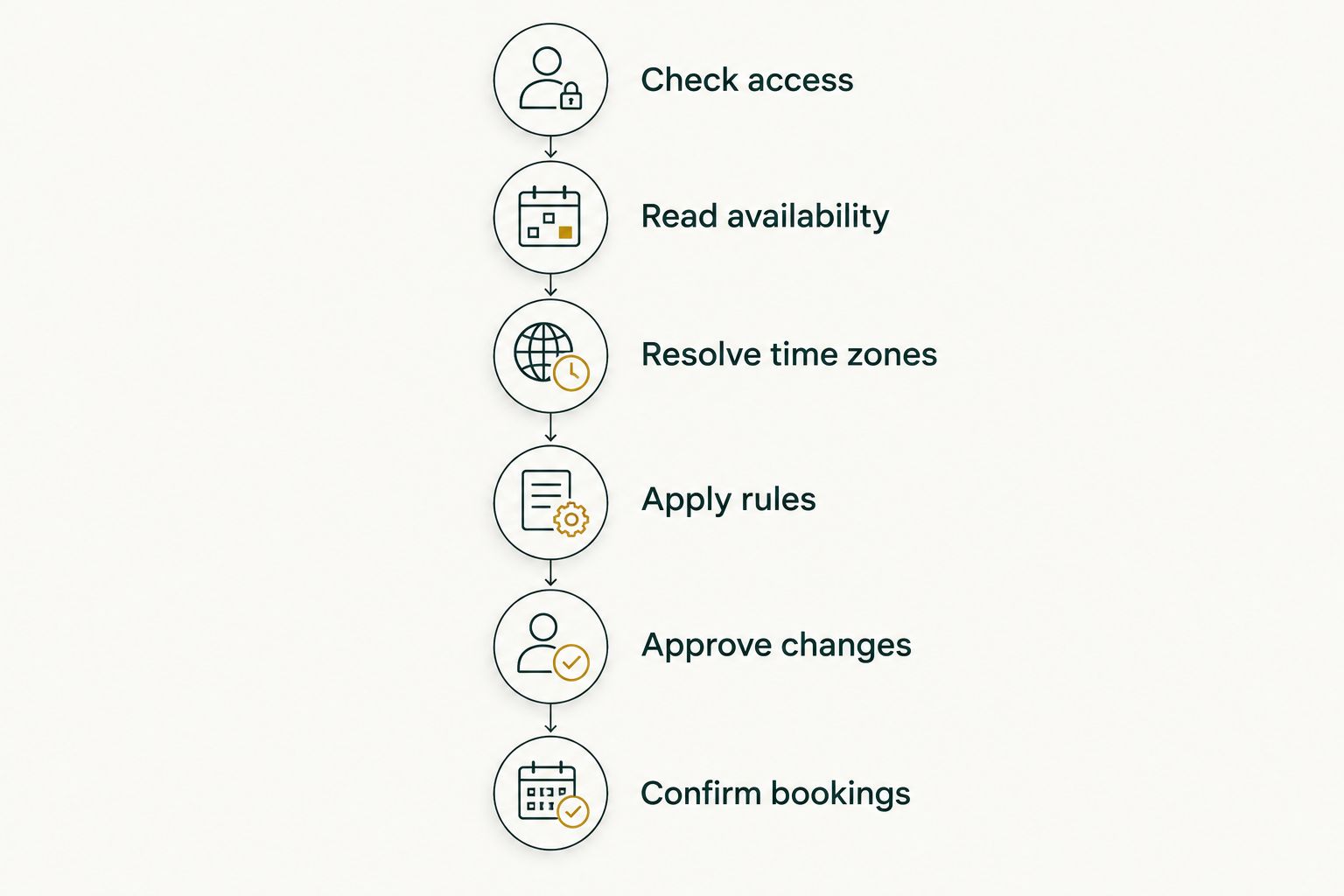
Use this sequence to assess an assistant or define its responsibilities:
- Check access. Identify every calendar that affects the person’s availability. Confirm which calendars the assistant can read and which it can update. An unreadable calendar is a blind spot, even if another calendar appears empty.
- Read availability. Combine busy periods across the relevant calendars without copying private appointment details into invitations. Decide whether tentative events, all-day entries, and personal commitments should block scheduling. An empty space is not automatically permission to book.
- Resolve time zones. Identify each participant’s time zone and calculate local times for the actual meeting date. Use location-based zones rather than an assumed permanent difference between offices. Recheck the conversion when a meeting moves to another date.
- Apply rules. Respect working hours, travel, preparation time, and protected appointments. Distinguish a client consultation from an internal catch-up. The person’s priorities determine which available slot is appropriate.
- Approve changes. Route exceptions to the person responsible for the calendar. Moving an existing appointment requires different authority from suggesting an open slot. Make that distinction explicit before enabling calendar changes.
- Confirm bookings. Check availability again before creating the event. Send the invitation from the intended organizer’s calendar and verify that the event exists. A suggested time is not a confirmed appointment.
The broader guide to AI tools for law firms covers options for research, drafting, and office work. Calendar management belongs inside that workflow, not in a separate conversation that loses the client’s context.
Why this matters
For professional service teams, a calendar mistake affects more than an internal meeting. It can disrupt a consultation, interrupt focused client work, or send an invitation that exposes information to the wrong people. You need scheduling rules that reflect the work, not just the gaps between events.
Your 2026 evaluation should separate three questions: Can the assistant see availability? Can it interpret availability correctly? Can it take the right action without exceeding its authority?
Those questions expose different failures. A calendar connection answers the first; it does not settle the other two. Choose the scheduling workflow before you choose how much control to hand over.
Multiple calendars need one clear availability policy
Start by deciding which calendars contribute to availability and which calendar receives new appointments. These are different decisions. Reading a personal calendar to avoid a conflict does not mean business invitations should be created there.
Write down the role of each connected calendar:
- Work calendar: The intended home for business appointments and the organizer’s invitations.
- Personal calendar: A source of blocked time, with private details kept out of scheduling messages.
- Shared calendar: Team or resource commitments that matter only when the appointment requires them.
- Travel calendar: Location changes and travel periods that affect where and when someone can meet.
These are calendar roles, not a requirement to connect every calendar you own. Include only the sources that determine availability. Unnecessary access adds information without improving the scheduling decision.
Next, define what counts as busy. A tentative hold, an all-day reminder, and a confirmed client appointment are not interchangeable. Tell the assistant how to treat each rather than leaving it to infer your priorities from event titles.
Also define the destination for new bookings. If the executive owns the appointment, the executive’s authorized calendar should own the invitation. If a team member is organizing it, the workflow needs that person’s authority instead.
The rule is simple: combine availability, but preserve ownership. A unified view should not turn separate calendars into an undifferentiated place to create or move events.
Time-zone handling must use the appointment date
A fixed offset between cities is not a safe scheduling rule. Daylight-saving changes happen on different dates in different jurisdictions, and some places do not observe them. The difference that works for a meeting this week can be wrong for a meeting next month.
In 2026, London is 5 hours ahead of New York for most of the year. During the periods when one city has changed clocks and the other has not, London is 4 hours ahead. The difference changes because the seasonal clock adjustments are 1 hour and do not happen together.
These are calendar rules, not an assistant’s performance claims. For 2026, the U.S. National Institute of Standards and Technology lists daylight saving from March 8 to November 1; GOV.UK lists UK clock changes on March 29 and October 25. Your scheduling workflow should calculate against the meeting date rather than store a permanent New York–London offset.
Ask for a location-based time zone, such as America/New_York or Europe/London, when an abbreviation is unclear. An abbreviation alone can be ambiguous. A city or location-based zone gives the conversion a clearer reference.
For recurring meetings, specify whose local time stays fixed. A meeting anchored to the organizer’s local time can shift on an attendee’s calendar when seasonal changes differ. Confirm whether the group accepts that shift or wants to adjust individual occurrences.
For your 2026 calendar, test both ordinary dates and clock-change periods. A correct conversion today does not demonstrate correct handling throughout the year.
Choose the assistant’s booking authority
An assistant can help with scheduling without having unrestricted permission to change calendars. Select a mode that matches the consequences of a mistake. These are workflow choices, not claims about any particular provider’s features.
| Scheduling mode | Best for | What it permits | Advantage | Limitation |
|---|---|---|---|---|
| Suggest only | Teams establishing scheduling rules | Propose times without creating events | Keeps calendar changes under direct human control | Someone still sends the invitation |
| Approval before booking | Client-facing appointments and exceptions | Prepare a booking for an authorized person to approve | Creates a clear decision point before an external commitment | Booking waits for approval |
| Booking within rules | Routine appointments with explicit boundaries | Create events that satisfy agreed conditions | Removes the separate approval step for permitted bookings | Incorrect rules can produce incorrect bookings |
Start with approval before booking when the rules are still being defined. Move routine appointments to rule-based booking only after you have checked how conflicts and exceptions are handled.
Keep cancellation authority separate. Permission to create an appointment should not automatically include permission to cancel an existing one. The same distinction applies to changing attendees, moving recurring series, or replacing the organizer.
Do not use a general instruction such as “manage my calendar” as the entire policy. It leaves the most consequential decisions undefined. Specify which actions are routine and which must stop for approval.
Why calendar scheduling varies between teams
The scheduling workflow changes with the team’s calendars and responsibilities. The relevant differences are concrete:
- Calendar coverage: Every calendar that blocks availability needs an agreed role in the workflow.
- Access permissions: Reading busy periods, reading event details, and creating appointments are different permissions.
- Time-zone rules: Meeting dates and seasonal changes determine the correct local times.
- Appointment purpose: Client consultations, internal meetings, and preparation blocks need different scheduling instructions.
- Approval ownership: Someone must have authority to approve exceptions and changes to existing appointments.
- Workflow scope: An inbox request, a calendar booking, and a related document task need clear handoffs.
Do not treat these differences as a reason to leave the instructions vague. Turn each into a rule the team can explain in plain language. If people disagree about whether an appointment is permitted, settle that disagreement before asking an assistant to act on it.
How do you test an assistant before handing over scheduling?
Test the workflow with controlled calendar entries before using it for client appointments. Evaluate the outcome, not just the wording of the assistant’s reply. A confident confirmation is insufficient if the event is missing or belongs to the wrong calendar.
Use these checks during your 2026 evaluation:
- Cross-calendar conflict: Place a busy event on a secondary calendar. Confirm that the assistant excludes the conflicting time without revealing private details.
- Clock-change conversion: Ask for a meeting on a date when the participants’ seasonal time changes differ. Verify each participant’s local time independently.
- Recurring appointment: Check what happens when a recurring meeting crosses a clock-change boundary. Confirm which participant’s local time remains fixed.
- Travel change: Change the executive’s expected location. Confirm that the workflow uses the agreed travel policy rather than silently guessing working hours.
- Concurrent booking: Add a conflicting event after a slot is proposed. Confirm that the assistant checks again before creating the appointment.
- Approval exception: Request a booking that violates a protected block. Confirm that the workflow stops for the designated approver.
Include a cancellation and a rescheduling request in the evaluation. Both affect an existing commitment, so they need their own authorization rules. Check that affected participants receive the intended update rather than a second, unrelated invitation.
Keep a written record of the expected result for each check. When the outcome differs, change the instructions or access settings and repeat the check. Do not resolve a failed test by simply asking the assistant to be more careful.
Where Bizzy fits into this workflow
Bizzy is an AI colleague from 33Labs that integrates with existing company tools and learns day-to-day workflows, including inbox work and scheduling. Its stated audience includes professional service teams in law, finance, real estate, and private practice.
Evaluate Bizzy for administrative scheduling only after confirming the calendars, permissions and actions included in your scope. That fit is strongest when scheduling belongs to a larger chain of work: reading a request, arranging the appointment, and preparing the next task.
The scope still needs boundaries. Before assigning multiple calendars across time zones, confirm the calendar connections, access permissions, date-specific conversions, and approval behavior required by your team. An AI colleague needs clear responsibilities the same way a new hire does.
Explore scheduling with Bizzy
Start with the calendars, scheduling rules, and approval boundaries your team needs.
Can an assistant avoid double bookings across separate calendars?
An assistant can avoid visible conflicts when it checks every calendar that determines availability and checks again before booking. That protection does not extend to commitments it cannot read or that your availability policy ignores. Keep protected time visible as busy, even when the event’s details remain private.
Can an assistant reschedule meetings across time zones?
An assistant can reschedule across time zones when it recalculates local times for the new date and has permission to change the appointment. Moving the date can change the offset between participants. Require approval when the change affects a client commitment, a protected block, or an entire recurring series.
Should an assistant see private appointment details?
An assistant does not need private appointment titles merely to exclude busy time. Where the calendar connection permits it, prefer access that supports the scheduling task without exposing unrelated details. Keep sensitive information out of invitations and explanations sent to other participants.
FAQ
Can an AI executive assistant manage my work and personal calendars together?
Yes, when it can read availability from both calendars and your rules explain which commitments block booking. Define the destination calendar for business invitations separately from the calendars used to check availability.
Will an AI assistant automatically understand different time zones?
Do not assume automatic time-zone handling from conversational ability alone. Require date-specific conversions and test the results across daylight-saving boundaries.
How far ahead is London from New York in 2026?
London is 5 hours ahead of New York for most of 2026 and 4 hours ahead during the seasonal transition periods when their clock changes differ. Calculate the difference for the appointment date.
Can I make the assistant ask before sending invitations?
Approval before booking is the workflow to request when you want control over outgoing invitations. Confirm that the implementation waits for an authorized decision before creating the event.
What happens if someone books a proposed slot before I approve it?
The assistant should recheck availability before creating the appointment. If the slot is no longer available, it should propose another time rather than book over the new commitment.
Is Bizzy intended for professional service scheduling?
Bizzy’s stated scope includes scheduling and other internal workflows for professional service teams. Confirm the calendar access, time-zone handling, and approval rules needed for your particular workflow.
Can an assistant move a recurring meeting without asking?
Only authorize recurring-series changes if your policy explicitly permits them. Otherwise, require approval and distinguish moving one occurrence from changing the entire series.
One last thing
An open calendar slot is not the same as a usable appointment time. Travel, preparation, private commitments, and the authority to move an existing meeting all affect the decision. Making more time visible does not resolve those rules.
Before handing over your 2026 scheduling, write one instruction that matters more than “find a time”: Book only when the required calendars are clear, the local times are correct, and the action is authorized. Everything else follows from that boundary.
Related guides
- AI automation for HR and staffing firms
- AI tools for solo law practitioners
- AI tools for family law attorneys
Sources and scope
The 2026 clock-change dates are published by NIST for U.S. daylight saving (March 8–November 1) and GOV.UK for UK clock changes (March 29 and October 25). The New York–London examples apply those rules; they are not a verified performance claim about any assistant.