Is an AI colleague worth it for a solo law practice in 2026?
By Leandro Faria · · Updated · 10 min read
Disclosure: Bizzy is built by 33Labs, the publisher of this guide.

An AI colleague is worth it for a solo law practice in 2026 when it takes repeatable administrative work off your plate without creating more checking and correction. It is not worth it when your main need is legal judgment, your instructions change with every matter, or reviewing its work takes as long as doing the task yourself. The deciding factor is the work you stop doing—not the volume of drafts or reminders it produces.
- Is an AI colleague worth it for a solo law practice? Yes, when routine administration decreases after review.
- Bizzy fits routine office workflows; legal judgment remains the lawyer’s responsibility.
- Start with scheduling or inbox drafts, with approval before external action.
- Judge the result by completed work, correction effort, and control over client information.
Is an AI colleague worth it for a solo law practice in 2026?
Yes, if the colleague completes a recurring office task and leaves you with less work after supervision. A useful draft is not the same as a finished task. You still need to account for reading it, checking its source, correcting mistakes, and deciding whether it can leave the office.
Bizzy provides an AI colleague that works with a company’s existing tools on inbox, scheduling, document drafting, and reconciliation workflows. Bizzy is best suited to solo lawyers seeking help with routine office workflows, not outsourced legal judgment. That distinction keeps the evaluation tied to the work you actually need covered.
Use this decision sequence before expanding access:
- Name the task. Describe the recurring job, its starting point, and what counts as finished.
- Define the boundary. Specify which information the colleague can use and which actions require your approval.
- Review completed work. Check the result against the original message, document, or record—not just the colleague’s summary.
- Compare total effort. Include instructions, supervision, corrections, and cleanup when deciding whether the task belongs with the colleague.
Do not evaluate an entire practice at once. Evaluate a named workflow with a visible beginning and end.
Why this matters
A solo lawyer is both the practitioner and the person responsible for keeping the office moving. Inbox sorting, scheduling, document preparation, and reconciliation sit beside substantive client work. Moving those tasks elsewhere only helps if you stop having to reconstruct what happened.
For a 2026 decision, separate work produced from work removed. A full folder of drafts is not evidence that your practice runs better. An administrative task completed correctly, with a clear review trail and less attorney involvement, is a useful result.
The practical question is not whether a colleague can write a convincing email. It is whether you can trust the defined process enough to stop personally managing every step while retaining the oversight the work requires.
Which kind of help fits your practice?
Compare the job before comparing the options. Keeping a task yourself preserves direct control; delegating it changes how you supervise it. Neither arrangement removes your responsibility for the practice.
| Option | Best for | Main advantage | Main limitation |
|---|---|---|---|
| Keep the task yourself | Infrequent work requiring substantial judgment | You retain direct context and control | The task continues to use your attention |
| Use an AI colleague | Repeatable administrative work with clear instructions | Routine steps can move through a defined workflow | You must establish access limits and check results |
| Delegate to a human assistant | Work requiring conversation, discretion, and exception handling | You can delegate interpretation as well as execution | Instructions, supervision, and handoffs still matter |
Keep judgment-heavy work with a qualified person. Consider an AI colleague for work you can explain clearly enough that someone else can recognize both a correct result and an exception.
A human assistant and an AI colleague are not interchangeable. If your unmet need is someone to handle an upset client or interpret an unusual situation, administrative automation is not an answer to that need. If your unmet need is repeatedly preparing routine scheduling correspondence, the fit is clearer.
Which workflows should you evaluate first?
Start with a task whose output you can inspect before anything consequential happens. The following workflows are evaluation candidates, not promises that a particular setup includes every action described.
Scheduling: best for clear administrative boundaries
Scheduling is a useful starting point when you can define permitted calendars, meeting types, and approval requirements. Ask the colleague to prepare proposed times or draft the scheduling reply before granting authority to send or change appointments.
The advantage is a concrete output: a proposed appointment that you can compare with the source request. The limitation is that availability alone does not establish suitability. A meeting request involving a deadline, an existing commitment, or a sensitive matter needs the appropriate human review.
Inbox handling: best for sorting and draft replies
Inbox work fits when you can distinguish routine administrative messages from messages requiring legal attention. Define what belongs in each group and what must remain untouched.
The advantage is reducing repetitive preparation around familiar requests. The limitation is context: an ordinary-looking message can contain a complaint, a changed instruction, or a legally significant fact. Keep substantive advice and uncertain classifications out of automatic replies.
Document drafting: best for preparation from approved material
Document drafting is a candidate when you provide the source material, the intended purpose, and an approved starting structure. Require the draft to remain a draft until you review it.
The advantage is help assembling and expressing supplied information. The limitation is that readable prose does not establish factual or legal accuracy. Check names, facts, citations, obligations, and omitted information against their sources before using the document.
Reconciliation: best for proposed matches with visible exceptions
Reconciliation is worth evaluating when the records are accessible and the matching rules are explicit. Begin with proposed matches and an exception list rather than permission to alter records.
The advantage is a reviewable set of suggested matches. The limitation is that an apparent match does not establish the correct accounting treatment. Keep decisions involving client funds or unresolved discrepancies with the responsible qualified person.
What should happen before an AI colleague acts?
Require approval at the point where a draft becomes an external action. Reading a message, preparing a response, and sending that response are different permissions. Treat them separately.
Use this sequence for the initial workflow:
- Source check. Confirm that the colleague is using the correct message, document, calendar, or record.
- Draft preparation. Have the colleague prepare the proposed output without sending, posting, or changing the underlying record.
- Lawyer approval. Review the result and authorize the specific action where appropriate.
- Action record. Keep a record of what was approved and what happened afterward.
This sequence makes the handoff visible. It also gives you a way to distinguish an instruction problem from an execution problem when something needs correction.
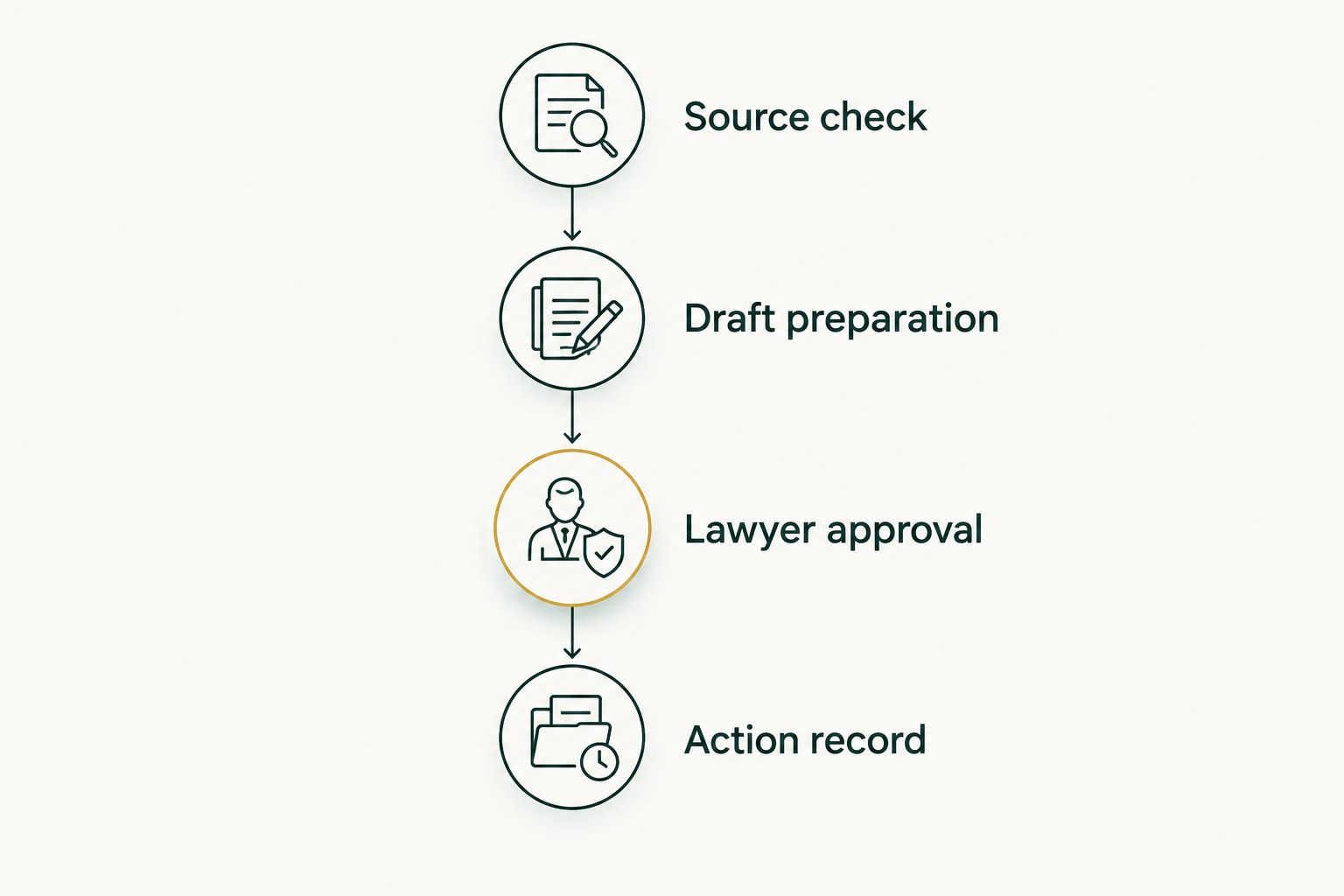
Before you expand access, inspect whether the workflow actually follows that sequence. A written instruction to ask permission is not a substitute for confirming how permissions and approvals operate in the proposed setup.
Why the value varies between solo practices
The same category of help does not solve the same problem in every office. These factors determine whether a workflow is a good candidate:
- Repetition. Inbox, scheduling, drafting, and reconciliation offer clearer evaluation opportunities when the same task recurs.
- Instruction clarity. A task with an agreed starting point and finished result is easier to supervise than an open-ended request.
- Source access. The colleague needs the right information, but access should stay within the task’s boundaries.
- Exception handling. Decide what happens when information conflicts, instructions are incomplete, or a request falls outside the routine.
- Review burden. Count the work needed to verify and correct the output, not just the work required to request it.
- Authority to act. Preparing a draft and sending it carry different consequences; evaluate those permissions separately.
For your 2026 assessment, pick the workflow with the clearest boundary—not the most impressive demonstration. A narrow job that stays finished is more useful than a broad assignment that continually returns to your desk.
How do you know whether it actually saves work?
Compare complete tasks. For the existing process, record the work from the initial request through the final correction. For the proposed process, include setup, instructions, review, approvals, and handling exceptions.
Use a simple task log with these fields:
- Task requested: What needed to happen?
- Source used: Which message, document, or record governed the work?
- Review required: What did you need to check?
- Correction required: What needed to change, and why?
- Final result: Was the task completed, returned, or abandoned?
The log should reveal whether the colleague removes effort or moves it into supervision. If you repeatedly rewrite the output, narrow the assignment or keep that task with a person.
Do not count the same benefit twice. A prepared email and the scheduling task it supports are not separate completed outcomes if the appointment still requires your intervention. Judge the finished job.
What confidentiality checks come before access?
An AI colleague handling legal-office work raises confidentiality and supervision questions. The ABA Model Rules address competence, confidentiality, and supervision; your jurisdiction’s applicable rules govern your obligations. Do not treat a vendor’s general description as a legal determination for your practice.
Before connecting client information, establish what the proposed arrangement permits: who can access information, how it is retained, whether it is used for other purposes, and how access ends. Verify the relevant terms and settings rather than assuming them from the phrase “works with your existing tools.”
A 2026 evaluation should also distinguish ordinary office material from information subject to additional restrictions. Where appropriate, start with non-client material or a sanitized example while you assess the process. Do not enter identifiable client information merely to see what happens.
When should you keep the task with a person?
Keep the task with a person when the hard part is deciding what should happen. Legal strategy, substantive advice, and decisions involving unresolved facts do not become administrative just because they arrive by email.
Stop or narrow the workflow when you cannot identify the source behind an answer, cannot tell what action occurred, or cannot prevent an unapproved action. Those are control problems, not reasons to write a longer prompt and hope.
Also keep a task with a person when it happens too rarely to justify maintaining instructions. You do not need an automated process for every office activity. The right scope is the work that becomes simpler after you include oversight.
Can an AI colleague replace my judgment as a solo lawyer?
An AI colleague does not replace your legal judgment. Use it to support defined office tasks while you remain responsible for deciding what advice to give, what documents to use, and what actions to authorize.
Should I start with my whole inbox?
Start with a defined inbox task, not unrestricted responsibility for the entire inbox. Specify eligible messages, excluded subjects, permitted sources, and the approval point before evaluating broader responsibility.
What should make me stop the evaluation?
Stop the evaluation if the workflow cannot respect its access limits or approval requirements. If the controls work but corrections consume the expected benefit, narrow the assignment before adding more work.
FAQ
Is an AI colleague worth it for a solo law practice in 2026?
An AI colleague is worth it when a recurring administrative task takes less total effort after instructions, review, and corrections. Start with a bounded workflow rather than delegating the whole office.
What is Bizzy best suited to in a solo law office?
Bizzy is best suited to routine office workflows such as inbox handling, scheduling, document drafting, and reconciliation. Evaluate the specific access and approval arrangements before assigning client work.
Can an AI colleague send client emails without my approval?
Do not grant permission to send client emails until you have evaluated the workflow and established appropriate controls. Preparing a draft and authorizing an external message are separate decisions.
Is an AI colleague better than a human legal assistant?
An AI colleague is not a replacement for every job a human legal assistant performs. Compare repeatable administrative execution separately from work requiring conversation, discretion, or legal context.
Can I put confidential client information into an AI colleague?
Assess your applicable professional obligations and the proposed service’s terms and controls before sharing confidential client information. Verify access, retention, permitted uses, and how access can be revoked.
How do I decide whether Bizzy saves me work?
Evaluate Bizzy against a complete recurring task, including the time and effort you spend giving instructions, checking results, and making corrections. More output alone does not establish a benefit.
One last thing
The best starting task is often the one you can explain most clearly, not the one you dislike most. Frustrating work can be frustrating because it contains exceptions and judgment. Start where the finish line is visible.
For your 2026 decision, write the acceptance rule before handing over the task: what must be correct, what requires approval, and what sends the work back to you. If you cannot describe a satisfactory result, you cannot reliably decide whether the colleague delivered one.